
| Product Specifications | |
|---|---|
| Tech Specs | |
| Product Type | Internal Desktop Power Supply |
| Rated Power | 240W |
| Form Factor | Tower / Mini Tower (MT) |
| Efficiency | 85%, 80 PLUS Bronze |
| AC Input | 90–264V AC, 4.0A Max, 47–63Hz |
| DC Output | +12VA 18A, +12VB 15A |
| Standby Ratings | +12VA 1.5A, +12VB 3.3A |
| Power Connectors | 8-pin motherboard + 2 × 4-pin processor (Dell-confirmed for 5000/7000 MT) |
| Compatible Models | Dell OptiPlex 3000 Tower, 5000 Tower, 7000 Tower — selected 240W configurations |
| Dell Part Number | Must match original PSU / Service Tag |
| Warranty Information | |
| Warranty | N/A |
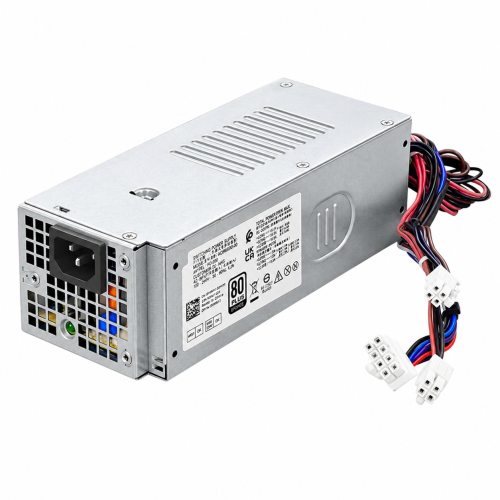
Dell OptiPlex 3000 5000 7000 MT 240W PSU Price in BDRestore reliable electrical power to a compatible Dell business desktop with the Dell OptiPlex 3000/5000/7000 MT 240W Desktop Power Supply. Dell officially documents a 240W internal power supply option for each of these Tower models, featuring 80 PLUS Bronze efficiency and regulated +12V power outputs. Designed for the electrical requirements of supported desktop configurations, this PSU category is a practical choice when replacing a failed original unit. Dell's OptiPlex 5000 and 7000 Tower specifications identify an 8-pin system-board connector and two 4-pin processor connectors for their 240W versions. Before ordering a replacement, confirm the original Dell part number, connector arrangement, electrical ratings and physical mounting requirements to ensure compatibility with your exact computer.
The Dell OptiPlex 3000/5000/7000 MT 240W Power Supply is an internal PSU category intended for compatible Dell business desktop towers. It converts incoming AC electricity into regulated DC power used by the motherboard, processor and supported internal components. Dell's official technical specifications identify 240W, 80 PLUS Bronze power supply configurations across all three Tower models, with matching published AC input and +12V output ratings. However, different OptiPlex systems may have distinct Dell spare part numbers, cable arrangements and chassis requirements. For this reason, the correct replacement should be identified from the original PSU label and the computer's service information rather than selecting a unit based only on wattage or desktop series.
The 240W power supply provides the rated electrical output specified by Dell for selected OptiPlex 3000, 5000 and 7000 Tower configurations. It is intended to support the computer's original motherboard, processor, storage devices and other approved internal hardware within the system's power budget. The 240W figure represents maximum rated output capacity, not the amount of electricity consumed continuously during everyday operation. For computers used in offices, educational environments and business applications, a properly matched replacement can help restore normal power delivery following a confirmed PSU failure. Dell also offers other power supply wattages for these Tower families, so a 240W replacement should only be selected for a configuration that supports it. This unit is not an automatic upgrade for systems requiring higher power capacity.
Dell officially specifies an 85% efficient, 80 PLUS Bronze power supply option for the 240W configurations of the OptiPlex 3000, 5000 and 7000 Tower desktops. Power supply efficiency describes how effectively the unit converts incoming AC electricity into usable DC output, with the remaining energy primarily dissipated as heat. Efficient conversion is useful in business computers that operate for extended periods, although actual power consumption depends on the installed hardware and workload. The 85% figure is Dell's published efficiency designation for the original 240W PSU option and should not be treated as a guaranteed measurement at every operating load. If purchasing a replacement from a different manufacturer or revision, check its own efficiency label before assuming that the same certification applies.
Dell's official OptiPlex 5000 and 7000 Tower documentation identifies one 8-pin system-board connector and two separate 4-pin processor connectors for their 240W power supply configurations. This arrangement differs from conventional desktop power supplies that use a standard 24-pin ATX motherboard connector. The dedicated power cables are designed to connect to the corresponding interfaces of supported Dell system boards. Before installation, compare the original PSU's connector shapes, populated wires, cable routing and electrical pin assignments with the replacement. The connector configuration for a specific OptiPlex 3000 Tower replacement must also be checked against its original hardware because matching wattage alone does not establish identical wiring. Never force connectors into place or use unverified power adapters.
The official Dell power specifications identify two rated +12V output rails for the 240W configurations across the OptiPlex 3000, 5000 and 7000 Tower models. The +12VA rail is rated for 18A continuous output, while the +12VB rail is rated for 15A continuous output. Dell also documents standby-mode current ratings of 1.5A and 3.3A for the respective rails. These figures describe the original Dell 240W PSU configurations and provide useful reference points when evaluating a replacement. Individual rail current ratings must not be added together to calculate a new combined wattage; the unit's maximum rated output remains 240W. Before installation, the replacement PSU's electrical label should be checked for matching output voltages, current limits and standby-power characteristics.
Dell specifies an input voltage range of 90–264V AC, an input frequency of 47–63Hz and a maximum input current of 4.0A for the original 240W Tower power supply configurations. These ratings allow operation across a wide range of compatible mains electrical supplies, including standard power environments in Bangladesh. The power supply converts incoming AC electricity into the regulated DC power required by the desktop's internal hardware. Buyers should distinguish the original Dell system specifications from the electrical label of any replacement PSU, since aftermarket units and different manufacturing revisions may have their own input ratings. The actual replacement must be approved for the local mains voltage and match the computer's required DC outputs. Electrical safety and correct part identification should take priority over visual similarity.
The Dell OptiPlex 3000, 5000 and 7000 Tower computers use internal power supply assemblies installed within their respective desktop chassis. Dell's service manuals describe procedures for removing and installing the PSU, securing it in the chassis and routing the power cables to the correct system-board connectors. Although each Tower family offers a 240W configuration, this does not establish that every physical PSU assembly is interchangeable across all three models. Replacement compatibility depends on the Dell part number, cable configuration, electrical pinout, mounting positions and enclosure dimensions. Dell also warns that power supply cables and ports may be color-coded for different wattages, making correct connection important. Buyers should compare the original unit's identification label and use the appropriate service instructions before installation. Always disconnect mains electricity before servicing and never open the PSU enclosure.
The Dell OptiPlex 3000/5000/7000 MT 240W Power Supply is intended for office IT administrators, desktop repair technicians, maintenance providers and owners of Dell OptiPlex Tower computers equipped with compatible 240W power supply configurations. It is particularly relevant when replacing a confirmed faulty original PSU in a business desktop used for document processing, internet access, administrative software or other routine computing tasks. Customers should verify their computer's exact model, Dell Service Tag, original PSU part number and connector configuration before choosing a replacement.
Looking for the Dell OptiPlex 3000/5000/7000 MT 240W Power Supply price in Bangladesh? Dell officially offers 240W, 80 PLUS Bronze power supply configurations for these three OptiPlex Tower models. A matching replacement can be a practical solution for repairing an existing Dell business computer without replacing the entire desktop. Check IT Source BD for the latest Dell OptiPlex 240W Tower Power Supply price in Bangladesh, stock availability, product condition and applicable purchase terms. Before ordering, confirm that the available PSU matches your original Dell part number, electrical specifications, motherboard and CPU power connectors, and chassis mounting requirements.
IT Source BD offers desktop replacement power supplies, computer components and repair accessories for customers in Bangladesh. Our product information focuses on accurate model identification, verified technical specifications and practical compatibility guidance. For Dell OptiPlex 240W Tower power supplies, checking the original Dell part number, rated output, connector arrangement and physical mounting requirements helps customers select a suitable replacement. Buyers can review product details, availability, condition and applicable purchase terms before placing an order.
Buy Dell OptiPlex 3000/5000/7000 MT 240W Power Supply from IT Source Bangladesh
Restore a compatible Dell business desktop with a correctly matched 240W replacement PSU. Confirm your original Dell part number, electrical ratings and connector configuration before purchasing.
Get specific details about this product from customers who own it.