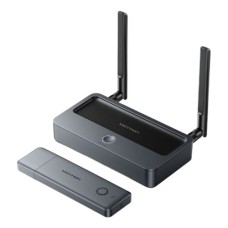
Professional Vention HDMI Extender with Clear Guidance & Best Prices at IT Source
Hey there, if you're looking for vention hdmi extender price in bd, you've come to the right place. I'm like your local shop owner here at IT Source, ready to guide you through this. A Vention HDMI extender is basically a smart device that lets you send HDMI signals over long distances without losing quality, perfect for when your TV or projector is far from your source like a laptop or console. It uses wireless tech to make things easy, no messy cables running everywhere.Compared to basic HDMI cables that stop at a few meters, these extenders go up to 200 meters in some models, and they're wireless so you avoid clutter. If you're into home theater, office setups, or even gaming during our common load shedding times in Bangladesh, this is what you need. Beginners love them because they're plug and play, no tech headache. And pros? They get stable signals with no lag.
Who really needs one? Folks setting up a big screen in another room, teachers for classrooms, or anyone with CCTV that needs far reach. At IT Source, we stock only original Vention products, so you know it's reliable. We've been helping Bangladeshi customers for years with fair prices and quick fixes if anything goes wrong. Why not check our site to see the latest stock.and on vention hdmi extender price in bd, we keep it transparent so you can buy with confidence. Message us if you have questions, we're here to help.
Must-Have Features to Check Before You Buy – Avoid Problems & Get the Best Performance
Before jumping in, let's talk about what makes a good Vention HDMI extender stand out. These features ensure you get smooth video and audio without interruptions, especially in our busy homes or offices here in Bangladesh.
- Wireless Range: Look for models that go up to 40m or even 200m. The shorter ones like 40m are great for small rooms, while 200m handles big spaces or through walls.
- Resolution Support: Make sure it handles Full HD 1080p at 60Hz. This keeps your movies or games looking sharp, no blurry stuff.
- Plug and Play Setup: No need for apps or WiFi, just connect and go. Vention's got this down, with USB-C power that's easy to find.
- Anti-Interference Tech: On 5GHz band, it fights off signal drops from other devices around you.
- Compatibility: Works with TVs, laptops, projectors, and more. Some even support 3D and Dolby audio for that extra fun.
As a bonus tip, always check the power needs, like 5V adapters, and think about where you'll place them to max the range. If you're unsure, pop over to our site at IT Source for more details.
Which Vention HDMI Extender Is Right for You?
Picking the right one depends on your setup, but don't worry, I'll break it down simple. We focus on Vention at IT Source, but if you need others like Ugreen or Elgato, we can guide you too.
- For home use or small office: Go with basic models like Vention ADCBO, around ৳10,200, for up to 40m range. Perfect if you're just extending to the next room.
- For gaming or presentations: Try mid-range like Vention ADKB0 at about ৳10,550, with low lag and up to 50m. It handles multiple devices well.
- For big venues or CCTV: Pro options like Vention ADPH0-1 for ৳19,800, reaching 200m with strong signals. Great for classrooms or events.
- Enterprise needs: If you want top-end, check Vention ADTH0 – call us for price, it's built for heavy duty with no lag.
See which fits your space? Head to IT Source site to compare them side by side.
Benefits of Buying a Good Quality Vention HDMI Extender: Better Performance & Long-Lasting
A solid Vention HDMI extender changes how you use your tech, making everything smoother and more fun. Instead of dealing with short cables or weak signals, you get freedom to place devices anywhere.
- Clear Video and Audio: Enjoy Full HD without drops, perfect for family movie nights or work calls.
- No Lag for Gaming: Low latency means your games feel real-time, no frustrating delays.
- Durable Build: Made with ABS or aluminum, they last through our humid weather in Bangladesh.
- Easy Expansion: Connect multiple rooms or devices, like from laptop to TV across the house.
Just a gentle note, cheaper knockoffs might save money now but could fail quick with poor signals. Stick to originals from IT Source for peace of mind. Why not browse our options today?
Super Easy Plug-and-Play Setup – Perfect for Beginners
Setting up a Vention HDMI extender is straightforward, even if you're not tech-savvy. It's designed for quick start, so you can enjoy it right away.
- Unbox the transmitter and receiver – plug the transmitter into your source device like a laptop via HDMI.
- Connect the receiver to your display, say TV or projector, with another HDMI cable.
- Power both units using USB-C or adapters – they light up when ready.
- Pair them if needed, usually automatic, and you're set – test with a video to check.
Quick tips: Place them in open spots for best range, avoid metal barriers. If signal weak, move closer or restart. Message us at IT Source if you need help with yours.
Vention HDMI Extender Comparison Table - Latest Price & Key Features
|
Model Name
|
Key Features
|
Best For
|
Price (BDT)
|
|
VENTION ADCBO (ADCB0)
|
Plug-and-play, 5GHz, low lag, 1080p@60Hz
|
Small home, next-room TV, beginners
|
10,200৳
|
|
Vention ADKB0
|
Low latency, multipoint, mirror/extend
|
Gaming, presentations, medium rooms
|
10,550৳
|
|
VENTION ADPH0-1
|
Dual-antenna, long range, through walls
|
Big house/office, classroom, CCTV far away
|
19,800৳
|
Pro Insider Tips: Unlock Maximum Performance from Your Vention HDMI Extender
At IT Source, we’ve learned these small tricks from helping hundreds of customers in Dhaka and all over Bangladesh. Follow them and your Vention extender will give you smooth, clear Full HD video without any headache – even during load shedding or in crowded WiFi areas.
- Place the units with clear line of sight whenever possible The best signal comes when the transmitter (connected to your laptop or console) and receiver (connected to your TV or projector) can see each other directly. Avoid thick walls, metal shelves, or big furniture blocking the path. Even if your model (like ADPH0-1) can go through walls up to 200m, starting with open space gives you the strongest and most stable connection. A little adjustment in position can make a huge difference in range and quality.
- Always use good quality HDMI cables from the start Don’t save money on cheap or very long HDMI cables between your device and the transmitter, or between the receiver and TV. Low-quality cables can cause signal loss, blurry picture, or no sound even before the wireless part starts. Use short (1–3 meter), certified HDMI cables – this one simple step fixes most problems people think are from the extender.
- Reduce wireless interference from nearby gadgets Other things like WiFi routers, cordless phones, microwave ovens, or Bluetooth devices can disturb the 5GHz signal. Keep your Vention units at least 1–2 meters away from routers and metal objects. If you notice flickering or drops during important use, turn off extra WiFi devices nearby for a while. Vention already has good anti-interference tech, but giving it some breathing space makes it perform perfectly.
- Power them properly, especially during load shedding Use stable power – the included 5V adapters or any good-quality 5V-2A adapter works best. Weak or unstable power is a common reason for flickering or sudden disconnects. In Bangladesh, when electricity goes off, just connect both the transmitter and receiver to a power bank (5V-2A or higher). This keeps your movie, game, or presentation running smoothly without any break.
- Keep everything updated and restart occasionally Vention extenders are mostly plug-and-play, so no complicated updates are needed. Still, if your laptop, console, or TV has a firmware update available, install it – it often improves compatibility. Every couple of weeks, simply unplug both units for 30 seconds and plug them back in. This quick restart clears any small glitches and keeps the performance fresh and reliable.
These are the real, practical tips that make a big difference for our customers every day. Follow them and you’ll enjoy lag-free, crystal-clear wireless HDMI for a long time.
Why Thousands of Customers in Bangladesh Choose IT Source
At IT Source, we love making tech simple and enjoyable for everyone in Bangladesh. Our team works hard to bring you the best, like these Vention HDMI extenders, with a focus on what really matters to you – quality that lasts and service that feels like family.
- Genuine products only, so you get the real Vention performance without worries.
- Transparent pricing, always clear on vention hdmi extender price in bd, no extras hidden.
- Expert advice from our folks who know the products inside out, ready to chat anytime.
- Fast support, whether it's a question or a quick fix, we're on it right away.
- Convenient delivery, same day in Dhaka or nationwide, fitting your busy life.
- Hassle-free experience, from browsing to buying, with EMI options to make it easy.
We also have other cool stuff like multi port USB hub, high speed SSD enclosure, gaming gear, and more – perfect if you're building a setup. Come visit IT Source today, pick your Vention HDMI extender, and let's get you connected.
Pro Insider Tips: Unlock Maximum Performance from Your Vention HDMI Extender
At IT Source, we’ve learned these small tricks from helping hundreds of customers in Dhaka and all over Bangladesh. Follow them and your Vention extender will give you smooth, clear Full HD video without any headache – even during load shedding or in crowded WiFi areas.
- Place the units with clear line of sight whenever possible The best signal comes when the transmitter (connected to your laptop or console) and receiver (connected to your TV or projector) can see each other directly. Avoid thick walls, metal shelves, or big furniture blocking the path. Even if your model (like ADPH0-1) can go through walls up to 200m, starting with open space gives you the strongest and most stable connection. A little adjustment in position can make a huge difference in range and quality.
- Always use good quality HDMI cables from the start Don’t save money on cheap or very long HDMI cables between your device and the transmitter, or between the receiver and TV. Low-quality cables can cause signal loss, blurry picture, or no sound even before the wireless part starts. Use short (1–3 meter), certified HDMI cables – this one simple step fixes most problems people think are from the extender.
- Reduce wireless interference from nearby gadgets Other things like WiFi routers, cordless phones, microwave ovens, or Bluetooth devices can disturb the 5GHz signal. Keep your Vention units at least 1–2 meters away from routers and metal objects. If you notice flickering or drops during important use, turn off extra WiFi devices nearby for a while. Vention already has good anti-interference tech, but giving it some breathing space makes it perform perfectly.
- Power them properly, especially during load shedding Use stable power – the included 5V adapters or any good-quality 5V-2A adapter works best. Weak or unstable power is a common reason for flickering or sudden disconnects. In Bangladesh, when electricity goes off, just connect both the transmitter and receiver to a power bank (5V-2A or higher). This keeps your movie, game, or presentation running smoothly without any break.
- Keep everything updated and restart occasionally Vention extenders are mostly plug-and-play, so no complicated updates are needed. Still, if your laptop, console, or TV has a firmware update available, install it – it often improves compatibility. Every couple of weeks, simply unplug both units for 30 seconds and plug them back in. This quick restart clears any small glitches and keeps the performance fresh and reliable.
These are the real, practical tips that make a big difference for our customers every day. Follow them and you’ll enjoy lag-free, crystal-clear wireless HDMI for a long time.
What is the Vention HDMI extender price in BD?
The price of Vention HDMI extender price at IT Source, Vention HDMI extender start from just ৳10,200 for the basic ones and go up to ৳19,800 for the long-range models.
Which Vention HDMI extender is best for beginners?
The Vention ADCBO is perfect if you're new to this. It costs only ৳10,200, it's plug-and-play (no complicated setup), and it gives a good 40m range. Super easy to use!
Where should I buy a Vention HDMI extender in Bangladesh?
You should buy a Vention HDMI extender from IT Source! We keep only original Vention products, give fair prices, full warranty, and help you pick the right one.
Does it work with my old TV?
Yes, almost all Vention models work fine with any old TV or device that has an HDMI port and supports 1080p. It’s very compatible. If you're not sure about your setup, just tell us the details – we'll check for you!

-228x228.png)