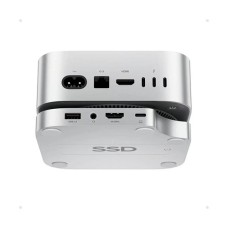
Pulwtop HDD-SSD Enclosure Price in BD 2026
Check Pulwtop HDD-SSD Enclosure prices in Bangladesh below. Starting from BDT 5,800৳ up to BDT 5,800৳, varieties of 1 products where 1 products are available. This price list was updated on 21-01-2026 by IT SOURCE, the Best Pulwtop HDD-SSD Enclosure shop in BD.
Pulwtop SSD Enclosure for Mac mini in Bangladesh — Premium Expansion at Fair Prices
Pulwtop SSD enclosures and Mac mini hub stand docks give you extra storage, more ports, and a clean workspace in one compact design. These products are perfect for Mac mini M4/M4 Pro users, content creators, video editors, photographers, and anyone who works with large files. You get fast M.2 NVMe SSD support, multiple ports (USB-C, USB-A, HDMI, SD card slots, and others), and a sturdy stand that lifts your Mac mini for better airflow and cable management. No need for separate dongles or external drives—everything stays neat and organized under your device.Whether you want to add a M.2 NVMe SSD, connect external displays, or access media cards, Pulwtop hub docks provide all-in-one convenience, transforming your Mac mini into a compact yet powerful workstation.
The setup is simple plug-and-play with premium build quality for daily reliability. At IT Source BD, genuine Pulwtop SSD enclosure price in Bangladesh ranges from ৳5,000 to ৳5,800—fair, transparent pricing with no hidden costs. All products come with warranty and expert local support to help you choose and set up easily. Visit IT Source BD today for the best Pulwtop docks and enclosures in Bangladesh.
What to Consider When Buying a Pulwtop SSD Enclosure
Selecting the perfect Pulwtop SSD enclosure or dock ensures it aligns perfectly with your Mac Mini setup and daily needs. Here's a detailed checklist to guide your decision:
- SSD Support: Compatible with M.2 PCIe NVMe SSDs in sizes 2230, 2242, 2260, and 2280 (most models support up to 4TB). Delivers 10Gbps speeds for fast storage expansion—ideal for backups, media libraries, or scratch disks. (SSD not included; does not support SATA SSDs.)
- Ports and Connectivity: Includes high-speed 10Gbps USB-C/A for data, multiple USB-A 2.0 for peripherals, SD/MicroSD card readers (up to 104Mbps), 3.5mm audio jack, and HDMI (4K@60Hz in select models) for monitors—providing all-essential expansions in one compact unit.
- Design and Build: Premium aluminum construction in silver finish that seamlessly matches the Mac Mini's aesthetics, with rounded edges and a precise fit for M4/M4 Pro models, making it look like an official Apple accessory.
- Cooling Efficiency: Vertical or stand-based design promotes excellent airflow around the Mac Mini and SSD, preventing overheating during prolonged use and maintaining consistent performance.
- Ease of Use: Completely tool-free SSD installation—just slide in your drive. Plug-and-play connectivity via USB-C means no drivers needed, and quick access to the Mac Mini's bottom power button via thoughtful cutouts.
By verifying these features, you'll get a reliable, future-proof dock that enhances storage, connectivity, and overall usability without cluttering your workspace.
Why Pulwtop SSD Enclosure Offer Long-Term Reliability and Performance
Pulwtop enclosures are built with premium components focused on efficiency, heat management, and durability, ensuring your investment delivers consistent performance over years of heavy use:
- High-Speed SSD Interfaces: Utilizing PCIe NVMe technology for up to 10Gbps transfers, these docks minimize bottlenecks when working with large files, reducing wait times and boosting productivity.
- Superior Heat Dissipation: The full aluminum body acts as a natural heatsink, efficiently drawing heat away from the SSD and Mac Mini. Combined with the vertical stand design, this promotes better airflow and prevents thermal throttling—even during intensive tasks like video encoding or 3D rendering.
- Energy Efficiency: Low-power components draw minimal electricity from your Mac Mini's USB-C connection (no external power needed), preserving battery life on portable setups and reducing overall energy consumption.
- Durable Construction: High-quality materials and precise engineering (including silicone pads for stability) ensure resistance to daily wear, vibrations, and minor impacts, providing reliable service for years while maintaining peak speeds.
This thoughtful hardware design not only extends the lifespan of your SSD and dock but also protects your data and maintains optimal performance, making it a smart choice for professionals who can't afford downtime.
Quick and Hassle-Free Installation Guide for Pulwtop SSD Enclosure
One of Pulwtop's standout advantages is its user-friendly design—getting your dock up and running is straightforward, even for beginners. Here's a step-by-step overview:
- Insert the M.2 SSD: Open the tool-free slot (usually at the base), slide in your compatible NVMe SSD (2230/2242/2260/2280 size), and secure it—no screws or tools required.
- Connect to Mac Mini: Plug the built-in USB-C cable into your Mac Mini's port. The dock fits perfectly under or beside your device as a stand.
- Format the SSD: If it's new, open Disk Utility on your Mac, select the drive, and format to APFS (best for macOS speed/security) or exFAT (for cross-platform use with Windows).
- Start Using Immediately: The SSD appears as external storage right away—transfer files, install apps, or use it for Time Machine backups.
- Optional Extras: Connect an external 4K monitor via HDMI, insert SD/TF cards for instant access, plug in peripherals to USB ports, or use the audio jack—all plug-and-play with no additional setup.
Most users are fully operational in under 15-30 minutes. The intuitive layout (front-facing ports, easy power button access) and macOS compatibility make it seamless, allowing you to focus on your work rather than configuration. If issues arise (e.g., new SSD not detected), a quick format usually resolves it!
Essential Maintenance Tips for Long-Lasting Pulwtop SSD Enclosure Performance
Proper care and usage habits can significantly extend the life of your Pulwtop SSD enclosure or dock, ensuring consistent high speeds, reliable data storage, and trouble-free operation for years. By following these practical tips, you'll protect your investment, prevent overheating, maintain data integrity, and get the most out of your Mac Mini setup.
- Choose high-quality NVMe SSDs for reliability and speed Opt for reputable brands like Samsung, Western Digital, or Crucial NVMe PCIe SSDs (e.g., 990 Pro or SN850X series). These drives offer better endurance, lower heat generation, and sustained performance compared to budget options. Avoid SATA SSDs, as Pulwtop docks are NVMe-only—using the right type prevents compatibility issues and ensures you hit peak 10Gbps transfer rates without throttling.
- Ensure proper ventilation and cooling Place your Pulwtop dock in an open, well-ventilated area—never enclose it in a tight cabinet or stack heavy items on top. The aluminum body and vertical stand design naturally dissipate heat, but good airflow around the Mac Mini and SSD slot is crucial to avoid thermal throttling during intensive tasks like video editing or large file transfers.
- Always format your SSD correctly before first use Use Disk Utility on your Mac to format the new SSD to APFS (recommended for macOS-only use—faster, more secure, and SSD-optimized) or exFAT (if sharing files with Windows PCs). This step ensures the drive is properly recognized, prevents errors, and optimizes read/write performance right from the start.
- Connect displays thoughtfully for optimal output When using the HDMI (or DP in premium models) port for external 4K monitors, use high-quality cables and match the resolution/refresh rate to your display's capabilities (e.g., 4K@60Hz or higher). This avoids strain on the dock's chipset, reduces heat buildup, and delivers smooth, flicker-free extended desktop experiences.
- Regularly check for updates and clean the device Periodically dust the vents and ports with compressed air to prevent buildup that could impede cooling. While Pulwtop docks are generally plug-and-play with no dedicated firmware, keep your macOS updated for best USB/Thunderbolt compatibility. If you notice any connectivity quirks, restarting your Mac Mini or reseating the SSD often resolves them.
Implementing these simple habits will keep your Pulwtop dock running at peak efficiency, minimize wear on the SSD, and help it last as long as possible—often delivering reliable service for 5+ years with heavy daily use. Your setup will stay fast, cool, and dependable!
Purchase now Authentic Pulwtop Products from IT Source BD
When it comes to purchasing premium tech accessories like Pulwtop SSD docks in Bangladesh, IT Source BD emerges as the most reliable and customer-focused option. The store is committed to delivering only 100% original Pulwtop products sourced through authentic channels, ensuring you receive genuine items with full manufacturer quality and performance guarantees. Pricing at IT Source BD is always fair and transparent, with no hidden charges or unnecessary markups, allowing you to enjoy competitive rates that truly reflect market value while occasional bundle deals make high-end upgrades even more affordable. What truly sets them apart is their team of experienced tech experts who offer personalized guidance on everything from model selection and SSD compatibility to setup tips and feature optimization, helping you make informed decisions tailored to your Mac Mini workflow.Upgrade your setup effortlessly with IT Source BD—your one-stop destination for premium Mac upgrades, multi-port USB hubs, wireless peripherals, high-speed HDD-SSD enclosure, and necessary Laptop accessories that elevate productivity and keep your workspace sleek and efficient.
Additionally, IT Source BD provides strong local support both before and after your purchase, with quick responses to queries, seamless handling of warranty claims or troubleshooting. Nationwide fast delivery, cash-on-delivery options, and a hassle-free shopping experience further add to the convenience, making IT Source BD not just a retailer but a trusted partner that ensures your tech investment is secure, satisfying, and built to last.
Does the Pulwtop dock include an SSD?
No, all Pulwtop SSD enclosures and hub docks are sold without an included SSD.This allows you to choose your preferred high-quality NVMe SSD separately for better customization and cost control.
What is the Pulwtop SSD enclosure price in Bangladesh?
The Pulwtop SSD enclosure price in Bangladesh ranges from approximately ৳5,000 to ৳6,500, depending on the model and retailer.For the latest pricing and availability, check our site IT Source BD.
Where to buy Pulwtop SSD enclosures in Bangladesh?
You can purchase original Pulwtop products from trusted retailers like IT Source BD.We offer genuine items with a warranty,expert support, and nationwide delivery for a reliable shopping experience.