
| Product Specifications | |
|---|---|
| Tech Specs | |
| Rated Power | 180W |
| Power Efficiency | 85% |
| AC Input Voltage | 100–240V |
| Installation | Internal |
| Power Supply Type | Fixed, Non-Hot-Plug |
| Supported Chassis | Tower |
| Compatible Models | ThinkCentre M70t, M70t Gen 3 |
| Warranty Information | |
| Warranty | N/A |
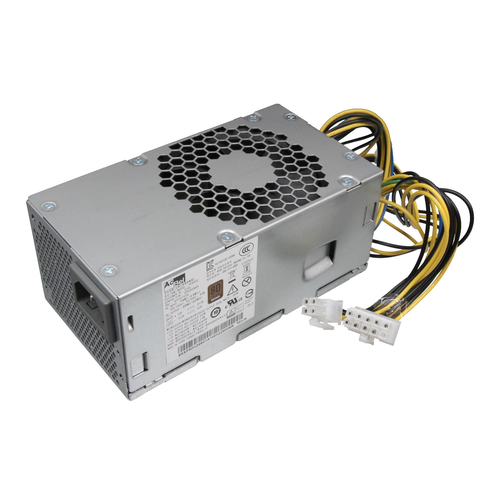
Restore your business desktop with the Lenovo ThinkCentre M70t M70t Gen 3 180W Desktop Power Supply. Designed for compatible Lenovo Tower computers, this internal replacement PSU combines efficient power conversion with a dedicated desktop installation design. It provides a practical solution for repairing faulty power supplies and maintaining existing office workstations without replacing the entire computer.
The Lenovo ThinkCentre 180W power supply is an internal hardware component responsible for converting incoming AC electricity into the DC power required by desktop computer components. It is intended for compatible ThinkCentre M70t series systems used in commercial offices, educational institutions and professional environments. Selecting the correct replacement PSU helps preserve existing hardware and reduce desktop maintenance costs.
The rated 180W output supports compatible factory configurations used for document processing, accounting, internet browsing and business management applications. It is suitable for standard productivity-oriented desktop hardware operating within its original power requirements, rather than systems upgraded with demanding graphics cards.
Lenovo specifies 85% power efficiency for the original 180W power supply configurations of both ThinkCentre generations. Efficient AC-to-DC conversion helps reduce energy loss and unnecessary heat generation, making this configuration appropriate for computers used throughout regular business hours.
The power supply is intended for internal installation within a matching Lenovo ThinkCentre Tower chassis. Its mounting arrangement and cable routing must correspond with the original component. Unlike universal ATX replacement units, Lenovo desktop power supplies require careful attention to physical and electrical compatibility.
Different ThinkCentre generations can use different motherboard and processor power connectors. Correct connector configuration and electrical pinout are essential for reliable operation. The original PSU label, FRU number and cable arrangement should be checked before selecting a replacement unit.
Power supply failure can cause startup problems, intermittent shutdowns or complete loss of system power. When the PSU has been identified as the faulty component, installing a compatible replacement can restore desktop functionality while retaining the existing processor, motherboard, memory and storage devices.
Both the Lenovo ThinkCentre M70t and M70t Gen 3 desktop families were offered with 180W power supply configurations. However, different generations and hardware configurations may require separate PSU part numbers. Compatibility must be confirmed using the original Lenovo FRU number, connector layout and mounting dimensions before installation.
This Lenovo 180W power supply is suitable for computer repair technicians, corporate IT departments, educational institutions, hardware service centers and individual users maintaining compatible ThinkCentre Tower desktops.
Customers looking for a Lenovo ThinkCentre M70t replacement PSU in Bangladesh can explore compatible power supply options at IT Source BD. Check the latest Lenovo ThinkCentre M70t M70t Gen 3 180W Desktop Power Supply price in Bangladesh, product availability and FRU compatibility before purchasing.
IT Source BD offers a specialized collection of Lenovo desktop power supplies, branded computer replacement parts and hardware accessories. Customers can compare power ratings, model information and compatibility requirements to identify suitable components for desktop repair and maintenance.
Restore Your Lenovo ThinkCentre Desktop
Order a compatible Lenovo ThinkCentre M70t M70t Gen 3 180W Desktop Power Supply from IT Source BD for your computer repair and maintenance requirements.
Get specific details about this product from customers who own it.