Looking for an XP-Pen graphics tablet in Bangladesh for digital drawing, illustration, photo editing, or online teaching? IT SOURCE BD offers a selection of XP-Pen digital drawing tablets designed for beginners, students, professional designers, and creative users. A graphics tablet allows you to draw, sketch, write, and edit directly on your computer using a pressure-sensitive stylus pen. Compared to using a traditional mouse, it provides more natural pen control and greater flexibility for creative work. Whether you are learning digital art or working on professional design projects, an XP-Pen drawing tablet can help turn your ideas into digital creations.
XP-Pen graphics tablets are available in different models with varying working areas, pressure sensitivity, shortcut keys, and connectivity options. These devices are useful for digital artists, illustrators, graphic designers, photographers, teachers, and students. If you are searching for the latest XP-Pen graphics tablet price in Bangladesh, IT SOURCE BD provides several options to explore according to your creative requirements and budget.
Working with digital illustrations requires accurate pen movement, comfortable handling, and responsive drawing performance. XP-Pen graphics tablets are designed to provide a natural drawing experience through pressure-sensitive stylus technology. They allow users to create different line thicknesses, add shading, make handwritten notes, and perform detailed editing tasks. Many models also feature battery-free stylus pens, customizable shortcut keys, and compatibility with popular creative software.
Another advantage is their versatility. You can use a compatible XP-Pen tablet for digital painting, sketching, photo editing, document annotation, online classes, and digital signatures. Depending on the model, Android connectivity and wireless operation are also available.
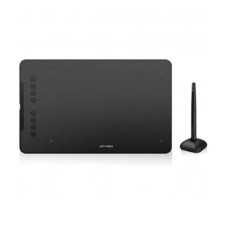
The XP-Pen Deco 01 V2 Digital Drawing Graphics Tablet is designed for users who need a spacious drawing surface and convenient creative controls. It features a 10 x 6.25-inch active area, 8192 levels of pressure sensitivity, and a battery-free passive stylus. Its 60-degree tilt support helps create natural brush strokes and shading effects. With eight customizable express keys, adjustable drawing-area brightness, and Android compatibility, it is suitable for digital artists, designers, and students.
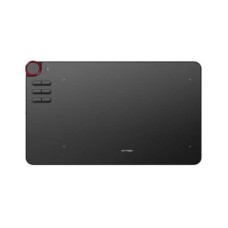
The XP-Pen Deco 03 Graphics Tablet offers a combination of creative controls and flexible connectivity. It features 8192 levels of pen pressure sensitivity, a 10 x 5.62-inch working area, and six customizable express keys. Its multifunction red dial provides convenient control while working on creative projects. The Deco 03 supports both wired and wireless USB connectivity, making it a practical option for users who prefer a flexible workspace. It also supports left-handed and right-handed operation.
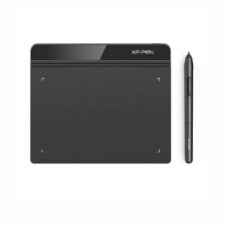
The XP-Pen Star-G640 Ultrathin Digital Drawing Graphics Tablet is a compact option for users who prefer a lightweight drawing device. It comes with a 6 x 4-inch active area, 8192 levels of pressure sensitivity, and a battery-free stylus pen. Its slim 2mm design makes it convenient to carry between home, office, and educational environments. The tablet is suitable for sketching, digital signatures, online teaching, photo editing, and everyday creative activities.
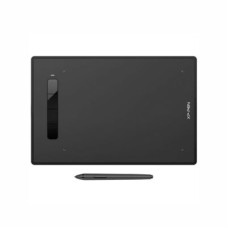
The XP-Pen Star-G960S Digital Drawing Graphics Tablet provides a larger 9 x 6-inch active working area for drawing and writing. It features 8192 pressure sensitivity levels, a battery-free stylus, and four customizable shortcut keys. Its 60-degree tilt support helps produce natural brush effects, while Android compatibility provides additional flexibility for supported devices. It is suitable for digital illustration, handwritten notes, online teaching, document annotation, and photo editing.
XP-Pen graphics tablets are useful for different types of users. Graphic designers and digital artists can use them for illustration, painting, and detailed creative work. Students can practice digital drawing, take handwritten notes, and participate in interactive learning activities. Teachers can explain lessons by writing or drawing directly on digital documents during online classes. Photographers can also use a compatible tablet for more controlled photo editing and retouching. Content creators and freelancers may find these devices helpful when working with digital artwork, presentations, and visual projects.
Before purchasing a drawing tablet, consider the active working area, pressure sensitivity, stylus type, shortcut keys, connectivity, and device compatibility. A larger working area can provide more room for detailed artwork, while a compact model may be easier to carry. Check whether the tablet supports your preferred operating system and drawing software. If you regularly work with shading and brush effects, tilt support may also be an important feature to consider.
IT SOURCE BD offers different XP-Pen graphics tablet models for customers looking for digital drawing and creative solutions in Bangladesh. You can compare available models, check their specifications, and select a suitable tablet based on your working style and budget. Whether you need a compact drawing tablet for learning or a larger model for professional creative projects, explore the available XP-Pen collection at IT SOURCE BD. Check the latest prices, stock availability, and product details before placing your order.