
| Product Specifications | |
|---|---|
| Tech Specs | |
| Product Type | Rechargeable Active Stylus |
| Color | Matte Black |
| Pen Protocol | Microsoft Pen Protocol (MPP) |
| Pressure Sensitivity | 4,096 Levels |
| Tilt Support | Yes, on Compatible Devices |
| Haptic Feedback | Supported on Selected Devices |
| Zero-Force Inking | Supported on Compatible Devices |
| Wireless Connectivity | Bluetooth 5.0 |
| Buttons | Side Button, Top Button with Eraser |
| Battery | Built-in Rechargeable Lithium-Ion |
| Battery Life | All-Day Typical Use |
| Charging | Compatible Surface Wireless Charging Accessories |
| Dimensions | 136.8 × 11.3 × 6.3 mm |
| Weight | 13g |
| Material | Plastic Enclosure |
| Compatible Devices | Selected Microsoft Surface Devices |
| Warranty Information | |
| Warranty | N/A |
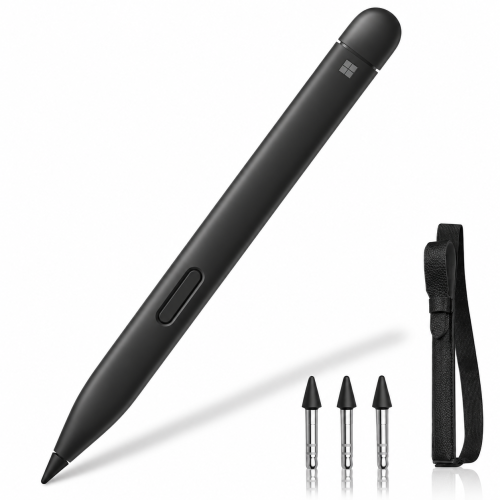
The Microsoft Surface Slim Pen 2 Matte Black is a premium rechargeable digital stylus designed for precise handwriting, drawing and productivity on compatible Microsoft Surface devices. Featuring 4096 pressure sensitivity levels, tilt recognition, zero-force inking and Bluetooth 5.0 connectivity, it provides responsive pen input for notes, sketches and document annotation. Its distinctive flat-sided design is comfortable to carry, while a built-in haptic motor delivers tactile feedback in supported Windows 11 applications and Surface devices. Compatible magnetic charging accessories help keep the pen powered and ready for everyday use.
The Microsoft Surface Slim Pen 2 is designed to make writing and drawing on compatible Surface screens feel more direct and responsive. Its fine pen tip supports accurate digital ink input, while pressure and tilt recognition provide useful control for handwritten notes, diagrams and creative work. A dedicated side button and top eraser simplify everyday editing, and Bluetooth connectivity enables supported pen shortcuts. On compatible Windows 11 Surface devices, tactile signals add subtle physical feedback during selected writing and interaction tasks. The pen uses a built-in rechargeable battery and requires a supported charging device or accessory rather than a disposable battery.
The Surface Slim Pen 2 supports 4096 pressure sensitivity levels, allowing compatible applications to respond to different amounts of pressure applied through the pen tip. This helps users produce controlled handwriting, varied line thickness and detailed digital sketches. Microsoft also includes zero-force inking technology, which allows the pen to register very light strokes on supported devices. The result is a responsive writing experience suitable for note-taking, PDF annotation, diagram creation and creative work. Actual pen performance depends on the connected Surface device and the capabilities of the application being used.
Tilt recognition allows the Surface Slim Pen 2 to detect changes in pen angle on supported devices. Compatible drawing applications can use this information to produce different brush effects, broader strokes and shading similar to working with a traditional pencil. This makes the stylus useful for designers, artists, students and professionals who regularly create handwritten diagrams or illustrations. The combination of pressure sensitivity and tilt control provides more creative flexibility than a basic capacitive stylus. Tilt support varies by Surface model, so users should check Microsoft's compatibility information before purchasing.
The Surface Slim Pen 2 includes a built-in haptic motor that can produce subtle tactile sensations during supported writing and interaction tasks. Microsoft refers to these sensations as tactile signals, which can make digital pen input feel more engaging on compatible Windows 11 devices. Haptic effects are available in selected applications and may vary depending on the activity. Users can adjust supported tactile settings through Windows. This feature is not available on every Surface device that supports pen input, so customers should distinguish basic writing compatibility from full haptic functionality.
Bluetooth 5.0 connectivity enables supported wireless shortcut functions when the Surface Slim Pen 2 is paired with a compatible device. The pen features a side button for right-click and selection actions, along with a top button that also functions as a digital eraser in supported applications. Users can configure available shortcut actions through Windows pen settings, making it convenient to open applications or access frequently used functions. Bluetooth pairing is primarily used for these additional controls; handwriting itself requires a compatible active-pen digitizer. The exact shortcut behavior depends on the operating system and application.
The Surface Slim Pen 2 features a built-in rechargeable lithium-ion battery designed for all-day use under typical conditions. Charging is supported through selected Surface devices and accessories, including compatible Surface Pro keyboards with dedicated pen storage, Surface Laptop Studio charging areas and the Surface Slim Pen Charger. The pen uses wireless charging when placed in the appropriate charging area. It does not have a standard USB-C charging port on its body, and a compatible charging accessory may need to be purchased separately. Battery life varies according to usage, Bluetooth activity and enabled features.
The Surface Slim Pen 2 features a distinctive slim, flat-sided body with a matte black plastic enclosure. Measuring approximately 136.8mm long, 11.3mm wide and 6.3mm high, it weighs just 13g, making it convenient to carry alongside a compatible Surface device. Its compact shape is particularly practical for storage in supported Surface keyboard pen compartments. The removable pen tip also allows replacement when needed, subject to Microsoft's handling guidance. This combination of portability, precise input and practical controls makes the pen suitable for everyday professional, educational and creative workflows.
The Microsoft Surface Slim Pen 2 Matte Black is suitable for students, teachers, designers, artists, business professionals and owners of compatible Microsoft Surface devices. It is useful for handwritten notes, digital drawing, PDF annotation, document review and supported Windows pen shortcuts. Users of Surface Pro 8, Surface Pro 9, newer compatible Surface Pro models and Surface Laptop Studio devices can benefit from its advanced pen features, with tactile feedback available on supported Windows 11 configurations. Customers should confirm their exact Surface model and charging accessory before ordering.
Looking for the Microsoft Surface Slim Pen 2 Matte Black price in Bangladesh? This rechargeable Surface stylus combines 4096 pressure sensitivity levels, tilt support, Bluetooth 5.0, digital eraser functionality and haptic feedback on compatible devices. Its slim design makes it a practical accessory for note-taking, drawing and everyday Surface productivity. Check IT Source BD for the latest Microsoft Surface Slim Pen 2 price in Bangladesh, stock availability and applicable warranty information. Before purchasing, verify that your Surface device supports the required pen features and that you have a compatible charging solution.
IT Source BD offers laptop accessories, active stylus pens and computer connectivity products for customers in Bangladesh. Our product information focuses on manufacturer-backed specifications, relevant device compatibility and practical buying guidance. For the Microsoft Surface Slim Pen 2, checking the exact Surface model, haptic support and charging accessory is especially important because pen features differ between compatible devices. Customers can review product availability and applicable purchase conditions before selecting the stylus.
Buy Microsoft Surface Slim Pen 2 Matte Black from IT Source Bangladesh
Upgrade your compatible Surface device with pressure-sensitive digital writing, tilt control, Bluetooth shortcuts and advanced tactile feedback.
Get specific details about this product from customers who own it.