
| Product Specifications | |
|---|---|
| Tech Specs | |
| Product Type | HDMI Video Capture Card |
| HDMI Input | 1 × HDMI |
| Maximum HDMI Input | 4K 30Hz |
| HDMI Loop-Out | 1 × HDMI |
| Maximum Loop-Out Resolution | 4K 30Hz |
| Maximum Capture Resolution | 2K 30fps |
| Full HD Capture | Up to 1080p 60fps |
| Host Connection | USB-A / USB-C |
| USB Standard | USB 3.0 |
| Video Formats | MJPEG / YUY2 |
| Audio Capture | HDMI Audio, up to 24-bit/48kHz |
| Compatible Systems | Windows, macOS, Linux, Android 5.0+, iPadOS 17+ |
| Compatible Software | OBS Studio, XSplit, PotPlayer, QuickTime Player |
| Power | USB Bus-Powered |
| Product Code | 25773 |
| Warranty Information | |
| Warranty | N/A |
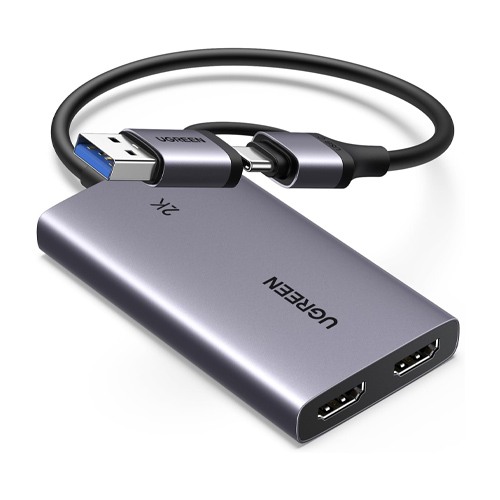
Looking for the UGREEN CM726 (25773) HDMI Video Capture Card price in Bangladesh? This compact video capture device is designed for gamers, live streamers, teachers and content creators who need to record external HDMI video while maintaining a separate display connection.
The UGREEN CM726 supports 4K 30Hz HDMI input, 4K 30Hz HDMI loop-out, up to 2K 30fps video capture and supported Full HD 1080p 60fps recording. Its USB-A and USB-C dual connector provides flexible connectivity for compatible computers and mobile devices.
Whether you want to capture PlayStation gameplay, record Nintendo Switch videos, connect an HDMI camera or create online tutorials, the CM726 offers convenient video capture and monitoring. Check the latest price and availability at IT Source Bangladesh.
The UGREEN CM726 is an external HDMI video capture card designed for recording and streaming video from compatible HDMI source devices.
It provides an HDMI input for receiving video from a gaming console, computer, camera or other supported equipment.
The HDMI input supports video resolutions up to 3840 x 2160 at 30Hz.
A separate HDMI output supports passthrough up to 4K 30Hz for connecting an external monitor, television or projector.
The USB capture interface supports video recording up to 2K at 30fps.
Supported Full HD 1080p 60fps capture modes are useful for recording smooth gameplay and other moving content.
The integrated USB-A and USB-C connector design makes the device convenient for different types of host equipment.
USB 3.0 connectivity provides a high-speed connection for transferring captured video and audio.
The device supports MJPEG and YUY2 recording formats and HDMI audio capture.
Compatibility with applications such as OBS Studio, XSplit, PotPlayer and QuickTime Player makes it useful for different recording workflows.
Its compact USB-powered design is suitable for desktop and portable use.
For customers looking for a UGREEN capture card in Bangladesh, the CM726 combines high-resolution HDMI passthrough with flexible Full HD and 2K recording capabilities.
The UGREEN CM726 accepts HDMI input signals up to 4K at 30Hz.
This allows compatible gaming consoles, cameras and computers to supply high-resolution video.
The incoming signal is processed for supported USB capture modes.
Users can connect an HDMI cable from their source device directly to the HDMI input port.
The 4K input specification should not be confused with the maximum recording resolution.
The CM726 supports video capture up to 2K at 30 frames per second.
This provides a useful high-resolution recording option for compatible applications.
It is suitable for gameplay videos, camera demonstrations, educational content and presentations.
Users can select supported video modes through their preferred capture software.
Actual recording performance depends on the computer, USB connection and software settings.
The UGREEN CM726 also supports Full HD recording at up to 1080p 60fps in compatible configurations.
This mode is useful for capturing gameplay and other video with frequent movement.
A 60fps recording can provide smoother motion than a 30fps recording when the source supports it.
Users should select the appropriate resolution and frame rate in their capture application.
Available recording modes depend on the host system and selected video format.
The CM726 includes a dedicated HDMI loop-out port supporting up to 4K 30Hz.
Users can connect a compatible monitor, television or projector to this output.
This allows the incoming video to remain visible while the USB host records the signal.
The feature is particularly useful for gaming and camera monitoring.
The connected display must support the selected HDMI signal format.
The HDMI loop-out connection provides a separate display path during video capture.
Gamers can continue viewing gameplay on a connected monitor while recording on a computer.
This avoids depending entirely on the preview window inside recording software.
Software previews can introduce additional delay depending on the host device.
For responsive gameplay, using the HDMI loop-out display is generally preferable.
The UGREEN CM726 features an integrated USB-A and USB-C host connector.
This makes it suitable for compatible desktop computers, laptops and supported tablets.
USB-A provides a connection option for traditional computer USB ports.
USB-C supports modern laptops and compatible mobile devices.
The host must support the required USB video capture functionality.
The CM726 uses USB 3.0 connectivity for transferring captured video and audio.
USB 3.0 provides a theoretical interface bandwidth of up to 5Gbps.
This is useful for supported high-resolution recording modes.
A compatible high-speed USB port is recommended for reliable performance.
The actual recording bitrate is different from the maximum USB interface speed.
The UGREEN CM726 supports MJPEG and YUY2 video recording formats.
MJPEG uses compressed individual video frames for compatible capture workflows.
YUY2 provides another video format option supported by certain recording applications.
Available resolutions and frame rates can vary by format.
Users should select a mode supported by their capture software and host device.
The CM726 captures compatible audio embedded in the HDMI signal alongside video.
This is useful for gameplay recordings, camera footage and presentations with sound.
The manufacturer's specifications list audio sampling support up to 24-bit at 48kHz.
Audio settings may need to be configured separately in some applications.
Testing audio synchronization before important recordings is recommended.
The UGREEN CM726 works with supported versions of OBS Studio.
Users can add the capture card as a video capture source.
OBS Studio can be used for local recording and live streaming.
Creators can combine the captured video with microphones, overlays and other content.
The final recording quality depends on the selected settings and computer performance.
UGREEN lists compatibility with applications including XSplit, PotPlayer and QuickTime Player.
These programs provide different options for displaying and recording captured video.
Users can select an application according to their operating system and workflow.
Available recording formats and controls vary between programs.
Confirm that the capture device is recognized before beginning a live broadcast.
The CM726 supports compatible HDMI gameplay capture from PlayStation 5 and PlayStation 4 consoles.
Connect the console to the HDMI input and a monitor to the HDMI output.
Connect the USB interface to a compatible computer for recording.
HDCP-protected video cannot be captured.
For supported gameplay recording, PlayStation HDCP settings may need to be disabled.
The UGREEN CM726 can receive supported HDMI video from compatible Xbox consoles.
It is useful for recording gameplay, tutorials and streaming content.
The HDMI loop-out connection allows gameplay to remain visible on an external display.
Recording resolution depends on the supported capture mode.
Protected video content may not be available for recording.
The CM726 can capture supported HDMI output from Nintendo Switch gaming systems.
A compatible HDMI-output dock is required for the original Nintendo Switch.
The HDMI input receives the gameplay signal.
The HDMI loop-out connects to a television or monitor.
The USB connection transfers the captured video to compatible recording software.
The UGREEN CM726 can receive HDMI video from compatible digital cameras.
This makes it useful for video tutorials, online teaching and live presentations.
Supported cameras can send their HDMI output to a connected computer through the capture card.
A clean HDMI output setting is recommended when users want to avoid camera menu overlays.
Camera compatibility depends on the output resolution and signal format.
The CM726 supports Windows 8.1, Windows 10 and Windows 11 according to its user manual.
Compatible recording software can detect the USB capture device.
Users can configure the capture resolution and audio source within their application.
Suitable USB bandwidth and computer performance are important for high-resolution capture.
Operating system permissions may need to be configured.
The UGREEN CM726 also supports compatible macOS and Linux systems.
Users can capture HDMI video through suitable software.
Application availability and supported video modes depend on the operating system.
Some programs may require manual video format selection.
Test the complete setup before starting an important recording.
The CM726 supports compatible Android devices running Android 5.0 or later.
A suitable USB video capture application is required.
Supported applications may include USB Camera or USB Camera Pro.
This allows compatible Android devices to display external HDMI video.
Not every Android device supports every capture resolution or frame rate.
UGREEN lists compatibility with supported iPads running iPadOS 17 or later.
Compatible video capture applications can display the incoming HDMI signal.
This may be useful for portable camera monitoring or supported console viewing.
The iPad must support the necessary USB capture functionality.
UGREEN specifically notes that this model is not compatible with iPhones for video capture.
The CM726 is designed for convenient plug-and-play operation on supported systems.
Users can connect the HDMI source, optional passthrough display and USB host connector.
A compatible capture application can then receive the video signal.
Normal operation does not require a dedicated proprietary capture driver on supported systems.
Application settings and permissions may still need configuration.
The UGREEN CM726 receives operating power through its USB host connection.
A separate external power adapter is not required for normal operation.
This makes the device convenient for portable recording and streaming setups.
The connected host must provide sufficient USB power.
The CM726 does not advertise USB-C Power Delivery laptop charging.
The CM726 is designed for convenient use with laptops and portable recording equipment.
Its integrated dual USB connector reduces the need for a separate USB-A or USB-C adapter.
The HDMI input and output allow straightforward integration into a recording setup.
Its compact construction is suitable for home studios, classrooms and travel.
Users should protect the device from excessive heat, moisture and physical damage.
The CM726 can help teachers and trainers capture video from compatible HDMI cameras and computers.
Captured video can be used for recorded lessons, demonstrations and supported live presentations.
The HDMI passthrough output provides an option for local monitoring.
Users can choose suitable recording software for their teaching workflow.
Check application compatibility before using the device for a live class.
The UGREEN CM726 offers practical video capture for gameplay, tutorials and product demonstrations.
It supports both high-resolution 2K recording and smooth Full HD recording modes.
HDMI passthrough allows creators to monitor the source while recording.
USB-A and USB-C connectivity provides flexibility across compatible host devices.
Recording software controls the final file format and storage location.
The UGREEN CM726 cannot capture HDCP-protected HDMI video.
Protected streaming services and certain media devices may therefore be incompatible.
PlayStation users may need to disable HDCP for permitted gameplay capture.
The capture card is not intended to bypass digital content protection.
Confirm that the source device provides a supported unprotected HDMI signal.
The CM726 supports 4K 30Hz HDMI input and 4K 30Hz passthrough.
Its maximum advertised USB capture resolution is 2K 30fps.
Full HD capture at 1080p 60fps is available in compatible configurations.
The device should not be described as a 4K recording card.
Users who require 4K recording should select a capture card with explicitly supported 4K USB capture output.
The UGREEN CM726 is suitable for gamers who want to record supported PlayStation, Xbox or Nintendo Switch gameplay while viewing the video on a separate monitor.
Live streamers can use the capture card with OBS Studio and other compatible applications for gameplay and camera-based streaming.
Content creators can capture HDMI video for tutorials, demonstrations and recorded presentations.
Teachers and professionals can use it with compatible cameras and computers for educational and business recordings.
Users with supported Android tablets or USB-C iPads can use the device with suitable applications for portable HDMI video viewing.
The manufacturer's user manual lists the following package contents:
1 x UGREEN CM726 HDMI Video Capture Card
1 x User Manual
1 x OBS Studio Quick Start Guide
HDMI cables, gaming consoles, cameras, monitors and other accessories are not listed as standard inclusions.
IT Source offers video capture cards, computer accessories and gaming connectivity products for customers in Bangladesh.
Customers can check their HDMI source, computer, tablet and recording software compatibility before purchasing.
Contact IT Source to confirm the latest price, stock availability, package contents and applicable warranty terms.
No. The CM726 supports HDMI input and passthrough up to 4K 30Hz, but its maximum specified recording resolution is 2K at 30fps. Supported Full HD recording modes can reach 1080p at 60fps.
Yes. It can capture compatible HDMI gameplay from these consoles. A suitable HDMI connection and compatible USB host are required. HDCP-protected content cannot be recorded.
Check IT Source for the latest UGREEN CM726 (25773) HDMI Video Capture Card price and availability in Bangladesh. Confirm compatibility, included accessories and warranty before ordering.
Check the latest price and availability at IT Source.
Enjoy 4K HDMI passthrough, detailed 2K capture, smooth Full HD recording and convenient USB-A/USB-C connectivity with the UGREEN CM726.
Get specific details about this product from customers who own it.