
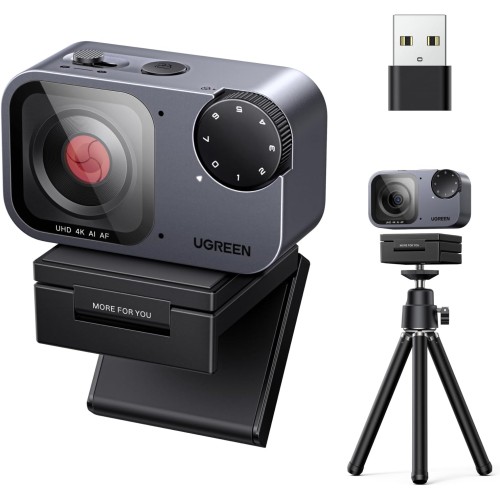
| Product Specifications | |
|---|---|
| Tech Specs | |
| Product Type | FineCam Pro 4K AI Webcam |
| Image Sensor | 8MP |
| Maximum Resolution | 3840 × 2160 (4K UHD) |
| Maximum 4K Frame Rate | 30fps |
| Autofocus | PDAF Autofocus |
| AI Features | Auto Tracking Auto Framing |
| Microphone | Dual AI Noise-Cancelling Microphones |
| Connectivity | USB-C USB-A Connection (Via Compatible Adapter) |
| Compatible Systems | Windows, macOS, Linux |
| Dimensions | Approximately 59 × 53 × 39mm |
| Product Code | 75726 |
| Warranty Information | |
| Warranty | N/A |
Looking for the UGREEN CM930 (75726) 4K AI Webcam price in Bangladesh? The UGREEN FineCam Pro is designed for users who want sharper video, intelligent camera framing and convenient audio capture for professional communication and online content.
Equipped with an 8-megapixel sensor, 4K Ultra HD recording at up to 30fps, PDAF autofocus and AI-powered subject tracking, the CM930 offers an advanced alternative to a standard laptop webcam. Its dual noise-cancelling microphones help capture speech while reducing some unwanted background sounds.
Whether you are attending business meetings, conducting online classes, streaming games or creating educational videos, the UGREEN CM930 provides a versatile USB camera solution. Check the latest UGREEN CM930 price and availability at IT Source Bangladesh.
The UGREEN CM930 is a smart 4K USB webcam created for modern communication and content production.
Its high-resolution image sensor captures detailed video suitable for professional meetings, presentations and streaming.
The webcam combines intelligent AI tracking with fast autofocus to keep supported subjects clearly visible.
This is particularly useful when a presenter moves while explaining a topic or demonstrating a product.
Dual built-in microphones provide convenient voice capture without requiring a separate microphone for basic communication.
Noise-reduction processing helps minimize some unwanted environmental sounds.
The camera supports compatible Windows, macOS and Linux computers.
Its USB connection makes installation straightforward for ordinary webcam functions.
The CM930 also offers flexible positioning for desktop, monitor and compatible mounting arrangements.
For professionals and creators in Bangladesh, it provides a practical combination of image quality, intelligent framing and everyday convenience.
The UGREEN CM930 supports video capture up to 3840 × 2160 pixels at 30 frames per second.
This resolution provides greater image detail than conventional 1080p webcams.
It is useful for professional presentations, content creation and high-quality video communication.
Actual recording or call resolution depends on the software, internet connection and computer performance.
The webcam features an 8MP image sensor designed to capture detailed video.
This supports the camera's 4K Ultra HD capability.
Higher image detail can help improve the appearance of faces, products and presentation materials.
Lighting conditions remain important for achieving the best image quality.
The CM930 features AI-powered automatic subject tracking.
The camera can identify supported subjects and adjust framing as they move.
This helps keep a presenter within the visible image area during compatible recording and communication sessions.
Tracking performance depends on lighting, subject movement and the selected operating mode.
AI framing helps position the presenter near the center of the video image.
This is convenient for online teachers, trainers and presenters who do not remain completely still.
It can reduce the need to manually readjust framing during a session.
Actual tracking behavior depends on the camera's supported AI functions.
The UGREEN CM930 uses Phase Detection Autofocus technology.
PDAF helps the camera adjust focus quickly when the subject changes position.
This is useful when a presenter moves closer to the camera or shows an object.
Good lighting and suitable subject distance help the autofocus system operate effectively.
Autofocus and AI tracking work together to improve supported dynamic presentation workflows.
The camera can adjust framing while maintaining focus on the intended subject.
This is helpful for product demonstrations and educational presentations.
Rapid movement, poor lighting or obstructions may still affect tracking accuracy.
The webcam includes two built-in microphones with AI-assisted noise reduction.
They provide convenient voice capture during meetings and video calls.
Noise processing can reduce certain unwanted background sounds.
It does not completely eliminate room echo, nearby conversations or keyboard noise.
The CM930 is suitable for compatible video meeting applications.
Its 4K-capable sensor helps provide detailed video when the platform supports the selected resolution.
Autofocus keeps the speaker clearer during ordinary movement.
The built-in microphones make it convenient for everyday business communication.
Teachers and trainers can use the webcam for virtual classes and recorded lessons.
AI tracking is useful when a presenter moves within the camera's supported field of view.
The detailed image helps show facial expressions and presentation materials.
Adequate lighting and a quiet environment help improve teaching quality.
The UGREEN FineCam Pro is suitable for supported live streaming workflows.
Its 4K video capability provides a detailed image source for compatible streaming software.
AI framing can help keep the creator visible while presenting.
Streaming resolution and frame rate depend on the application and computer hardware.
Content creators can use the CM930 to demonstrate products during recordings or live sessions.
PDAF autofocus is useful when the distance between the camera and subject changes.
High-resolution video helps capture product details under suitable lighting.
For close-up product photography, verify that the required working distance is within the camera's focusing range.
Published product information describes support for horizontal and vertical shooting modes.
Horizontal mode is suitable for conventional meetings, tutorials and widescreen video.
Vertical mode can be useful for portrait-oriented social content.
Maximum resolution may differ between orientations, with published documentation identifying 4K horizontal and 2K vertical operation.
The CM930 is also marketed with selectable image filter effects.
These can help creators change the appearance of supported video content.
Filters may be useful for casual streaming and creative presentations.
Available modes and controls should be confirmed against the supplied product instructions.
Published product information identifies gesture control among the webcam's smart features.
Supported gestures can provide convenient interaction with selected camera functions.
This may help presenters manage certain features without reaching for the computer.
Exact gesture commands depend on the product firmware and operating instructions.
The CM930 is described in product documentation as featuring a physical privacy cover.
Closing the cover blocks the lens when video capture is not required.
This offers a simple visual privacy measure during everyday use.
Users should also manage microphone permissions separately because a lens cover does not mute audio.
The webcam uses a USB-C connection for data and power.
This allows connection to compatible USB-C computer ports.
A suitable USB-A adapter can also provide compatibility with supported USB-A host ports.
Use the supplied or an appropriately rated data cable for reliable operation.
The CM930 is designed for straightforward USB webcam connectivity with compatible systems.
Basic camera and microphone operation can be available without a separate proprietary driver.
Advanced functions may depend on firmware, controls or supported software.
Choose the UGREEN webcam as the video and audio source in the communication application.
UGREEN identifies Windows as a supported operating system for the CM930.
The webcam can be used with compatible Windows computers and USB ports.
Users can select the camera in supported conferencing, recording and streaming applications.
Available video formats depend on application and hardware support.
The CM930 also supports compatible macOS computers.
Mac users can connect the webcam through a suitable USB connection.
Camera and microphone permissions may need to be granted to the selected application.
Feature availability can vary between applications and macOS versions.
UGREEN lists Linux among the supported operating systems.
The webcam can operate with compatible Linux systems and webcam applications.
Support for particular video modes and AI features may vary by distribution and software.
Users should verify their required application and operating-system compatibility.
The FineCam Pro is designed for convenient use with computer workstations.
Its mounting arrangement supports practical positioning for compatible monitors and desk setups.
Placing the camera near eye level generally provides a more natural video perspective.
Additional mounting options depend on the supplied accessories and compatible supports.
The CM930 features a compact housing suitable for desktop workspaces.
Its small form helps reduce clutter around the monitor.
The camera is practical for home offices, business desks and streaming setups.
Careful positioning helps achieve a stable view and consistent framing.
Although the CM930 features a high-resolution sensor, lighting remains important.
Soft front-facing illumination can improve facial detail and reduce harsh shadows.
Avoid placing a strong light source directly behind the presenter.
Better lighting can also assist autofocus and AI subject recognition.
The CM930's maximum published 4K frame rate is 30fps.
Do not describe the webcam as supporting 4K at 60fps.
Actual video quality depends on the host computer, USB connection, application and lighting conditions.
AI tracking and noise cancellation improve convenience but cannot guarantee perfect results in every environment.
The UGREEN CM930 is ideal for business professionals who want detailed video and clear communication during online meetings.
Online teachers and trainers can benefit from automatic framing and autofocus while presenting.
Live streamers and content creators can use its 4K-capable camera for compatible recording and broadcasting workflows.
Product reviewers can benefit from fast autofocus and detailed video when demonstrating objects.
Remote workers who frequently attend video calls can upgrade from a basic built-in laptop camera.
1 x UGREEN CM930 FineCam Pro 4K AI Webcam
1 x Camera Mount / Magnetic Base
1 x USB-C Data Cable
1 x USB-A Adapter
1 x User Manual
Some regional packages may include additional mounting accessories. Confirm the exact retail contents before listing a tripod as included.
IT Source offers webcams, computer peripherals and connectivity accessories for customers in Bangladesh.
Customers can review the CM930's 4K resolution, autofocus, AI tracking and microphone capabilities before purchasing.
Contact IT Source for the latest UGREEN CM930 price, stock availability and applicable local warranty information.
No. The manufacturer specifies 4K Ultra HD video at up to 30fps. Available frame rates at lower resolutions depend on supported video modes and applications.
Yes. The webcam includes AI subject tracking and automatic framing to help keep supported subjects centered during movement. Performance depends on lighting and the operating environment.
Contact IT Source for the latest UGREEN CM930 (75726) FineCam Pro 4K AI Webcam price and availability in Bangladesh. Confirm the included accessories and local warranty before ordering.
Buy UGREEN CM930 FineCam Pro 4K AI Webcam from IT Source Bangladesh
Upgrade your meetings, streaming and content creation with 4K video, intelligent AI tracking, PDAF autofocus and dual noise-cancelling microphones.
Get specific details about this product from customers who own it.