
| Product Specifications | |
|---|---|
| Tech Specs | |
| Product Type | HDMI KVM Switch |
| KVM Configuration | 2 Computers to 1 Monitor |
| Video Inputs | 2 × HDMI |
| USB Host Inputs | 2 × USB 2.0 Type-B |
| Video Output | 1 × HDMI |
| Shared USB Ports | 2 × USB 2.0 Type-A + 2 × USB 1.1 Type-A |
| Maximum Resolution | 4K UHD (3840 × 2160) @ 30Hz |
| Full HD Support | 1920 × 1080 @ 60Hz |
| HDMI Version | HDMI 1.4 |
| HDCP Support | HDCP 1.4 |
| Switching Methods | Physical Button, Keyboard Hotkey |
| Power Supply | USB Host-Powered |
| Material | ABS + PVC |
| Color | Black |
| Dimensions | 134 × 66 × 26mm |
| Compatible Devices | Computers with HDMI video output and USB host connection; HDMI monitors; compatible USB keyboards, mice and peripherals |
| Warranty Information | |
| Warranty | N/A |
The UGREEN CM200 (50744) 2-Port HDMI KVM Switch is designed for users who need to control two computers with one HDMI monitor, keyboard and mouse. Instead of using separate monitors and input devices for each computer, this KVM switch lets you select which connected system appears on the shared display and receives keyboard and mouse input.
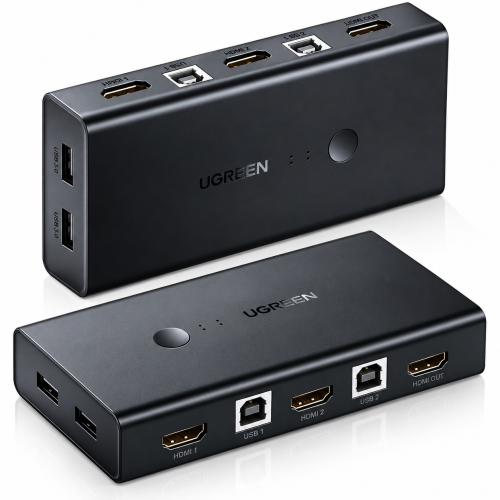
Supporting HDMI 1.4 video output up to 4K UHD at 30Hz, the UGREEN CM200 is suitable for compatible office monitors, desktop computers and multi-PC workstations. It features two HDMI computer inputs, two USB-B host connections, one HDMI monitor output and four shared USB-A ports. Users can switch between connected computers using the physical selection button or supported keyboard hotkeys.
Explore the UGREEN CM200 (50744) HDMI KVM Switch price in Bangladesh at IT Source. Its compact design, shared USB connectivity and convenient switching make it a practical choice for office desks, IT maintenance stations and home workspaces where two computers need to share one monitor and a single set of peripherals.
The UGREEN CM200 (50744) is a compact HDMI KVM switch designed to share one monitor and USB peripherals between two computers. Each computer connects through its own HDMI input and USB 2.0 Type-B host connection, while the shared equipment connects to one HDMI output and four USB-A peripheral ports. The USB-A connections include two USB 2.0 ports for compatible accessories and two USB 1.1 ports intended for keyboard and mouse use. UGREEN's regional specification lists HDMI 1.4 with a maximum display mode of 4K at 30Hz and support for 1080p at 60Hz. The unit supports physical-button and keyboard-hotkey switching, allowing users to choose which computer controls the shared display and USB devices. It also supports HDMI-related functions including CEC, DDC and HDCP 1.4, subject to connected-device compatibility. The CM200 measures approximately 134 × 66 × 26mm and uses an ABS and PVC housing. Its two USB-B host connections also provide operating power from the connected computers, avoiding the need for a separate power adapter under normal conditions. This makes it useful for home offices, dual-PC desks, technical workstations and computer maintenance environments.
The UGREEN CM200 allows two computers to share a single HDMI monitor, keyboard and mouse. Each computer has a dedicated HDMI video input and USB-B host connection, so the switch can direct the shared display and USB peripherals to the selected computer.
This configuration is useful for a work PC and personal PC, an office desktop and a maintenance computer, or two systems on the same technical workbench. Only one computer is selected for the shared monitor and peripherals at a time. The CM200 is not designed to show both computers simultaneously or operate two independent monitors.
The UGREEN CM200 (50744) supports HDMI video output up to 3840 × 2160 at 30Hz according to the UGREEN India product specification. It also supports 1920 × 1080 at 60Hz when the connected computer, HDMI cables and monitor support that display mode.
The switch uses HDMI 1.4 and supports compatible HDMI audio through the selected video connection. For reliable operation, both computers and the monitor should support the desired resolution and refresh rate. This listing does not advertise 4K at 60Hz because published specifications for SKU 50744 differ between suppliers.
The CM200 includes four USB-A peripheral connections: two USB 2.0 ports and two USB 1.1 ports. The USB 1.1 connections are intended for a keyboard and mouse, while the USB 2.0 ports can be used for compatible accessories such as a USB printer or flash drive.
These ports allow selected peripherals to be shared between two connected computers without repeatedly unplugging their cables. USB 2.0 devices are limited to USB 2.0 performance, and the switch does not provide USB 3.0 or higher-speed USB connectivity. Devices requiring more power than the available USB supply may need their own power source.
The UGREEN CM200 provides a physical selection button for changing between connected computers. Supported keyboard hotkeys offer another switching method, allowing users to change the active computer from the shared keyboard without reaching for the KVM unit.
For keyboard hotkey switching, the keyboard must be connected to the designated USB 1.1 keyboard port. A buzzer can confirm channel changes, and UGREEN's product information describes a hotkey method for disabling the buzzer. The active selection determines which computer receives the shared keyboard, mouse and USB peripheral connections.
The CM200 normally receives operating power through the USB-A-to-USB-B connections from its two connected computers. UGREEN specifies that a separate external power adapter is not required for normal operation, simplifying installation in a standard dual-computer workstation.
The switch measures approximately 134 × 66 × 26mm and has a black ABS and PVC housing. Its compact size makes it convenient to place beside a monitor or on a desktop. Keep the unit dry and ventilated, and check the power requirements of connected USB peripherals before use.
The UGREEN CM200 is useful where two computers need access to the same monitor and input devices. It can simplify a home office, reduce duplicate keyboard and mouse setups at a business workstation, or help a technician switch between two computers during maintenance and troubleshooting.
To use the switch, connect each computer's HDMI output to its corresponding HDMI input and connect each computer's USB-A port to the appropriate USB-B host port. Then connect the monitor to the KVM's HDMI output and attach the shared keyboard, mouse and other supported USB peripherals. Correct HDMI signal direction and USB host wiring are essential for operation. Computers with only USB-C video outputs may require suitable external adapters, which should be checked separately.
The UGREEN CM200 (50744) HDMI KVM Switch is suitable for office professionals, IT support technicians, computer repair workshops, home office users and anyone operating two computers from one desk. It is particularly useful when a personal computer and work computer need to share a single HDMI monitor, keyboard, mouse and selected USB accessories. The 2-computer-to-1-monitor configuration helps reduce the need for duplicate peripherals, while 4K at 30Hz support provides a suitable display option for compatible productivity monitors. Physical-button and keyboard-hotkey switching offer convenient control, and the compact USB-powered design makes the switch practical for everyday desktop installations. Users who require two monitors, USB 3.0 data speeds or 4K at 60Hz should choose a different KVM model with those specific capabilities.
Choose the UGREEN CM200 (50744) if you need to share one HDMI monitor, keyboard and mouse between two computers. Check that both computers have suitable HDMI outputs and USB-A host connections, and confirm that the monitor accepts HDMI input. This model supports up to 4K at 30Hz, not a verified 4K at 60Hz, and its shared USB ports operate at USB 2.0 or USB 1.1 speeds. If you need a dual-monitor setup, high-speed USB 3.0 storage sharing or a higher 4K refresh rate, compare other KVM switches before purchasing.
Confirm that your setup contains two computers and one HDMI monitor. Check the HDMI ports on both computers and the monitor, then verify that each computer has an available USB-A port for the USB-B host connection. Count the HDMI cables required for your installation and check the cables available with the actual product. Confirm that your keyboard can use the designated USB 1.1 port if hotkey switching is important. Before ordering from IT Source Bangladesh, verify the exact model number CM200 (50744), product condition, current price, stock availability and applicable warranty terms.
Explore the UGREEN CM200 (50744) HDMI KVM Switch at IT Source Bangladesh for convenient dual-computer workstation management. This UGREEN model combines a two-computer HDMI switching design, a single HDMI monitor output, four shared USB-A ports and physical-button or keyboard-hotkey control in a compact desktop unit. Its published 4K at 30Hz capability makes it relevant for compatible office and productivity displays, while the shared keyboard and mouse arrangement helps simplify multi-PC workspaces. Before purchasing, contact IT Source to confirm the available product revision, current selling price, stock status, warranty coverage and any cables included with the supplied unit.
Yes. It is a 2-input, 1-output HDMI KVM switch that lets two computers share one HDMI monitor, keyboard, mouse and compatible USB peripherals. Only one computer is active on the shared monitor at a time.
UGREEN India's published specification for SKU 50744 lists up to 4K at 30Hz. Some third-party listings differ, so 4K at 60Hz should not be assumed without verifying the exact hardware revision and manufacturer documentation.
Yes. The switch includes two shared USB 2.0 Type-A ports for compatible USB accessories, alongside two USB 1.1 ports intended for keyboard and mouse connections. The selected computer controls the shared USB devices.
Check the UGREEN CM200 (50744) HDMI KVM Switch price in Bangladesh at IT Source.
Get specific details about this product from customers who own it.