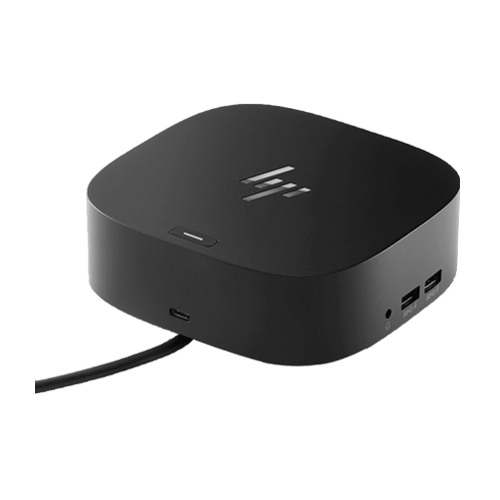
HP USB-C Dock G5 (5TW10AA) Price in Bangladesh
Looking for the HP USB-C Dock G5 (5TW10AA) price in Bangladesh? This universal black USB-C docking station helps turn a compatible laptop into a practical desktop workstation through a single host cable. Connect external monitors, USB accessories, wired networking and audio devices while delivering USB-C charging power to supported laptops.
The HP USB-C Dock G5 features two DisplayPort 1.4 outputs, one HDMI 2.0 port, four USB-A ports, one front USB-C port with up to 15W output, Gigabit Ethernet and a combined audio jack. It supports up to three external monitors with compatible host hardware and up to 100W charging for supported HP laptops, with different limits for non-HP systems.
Its compact black design is suitable for office desks, home workstations and hybrid working environments. Before ordering, confirm that your laptop supports USB-C DisplayPort Alt Mode and USB Power Delivery. Check the latest price and availability at IT Source Bangladesh.
Top Highlights
- Universal USB-C ConnectionConnect compatible HP, MacBook and other laptops through one host cable.
- Multi-Monitor ConnectivityTwo DisplayPort 1.4 outputs and HDMI 2.0 support flexible display setups.
- Up to 100W Laptop ChargingUSB-C Power Delivery for supported HP hosts; non-HP charging may be lower.
- Essential Desktop PortsFour USB-A ports, front USB-C, Gigabit Ethernet and a combo audio jack.
About the HP USB-C Dock G5 (5TW10AA)
The HP USB-C Dock G5 (5TW10AA) is a universal black docking station designed to expand the connectivity of compatible USB-C laptops. It combines external display outputs, USB peripherals, wired networking, audio and laptop charging through a convenient single-cable connection. Its video connections include two DisplayPort 1.4 ports and one HDMI 2.0 port, enabling up to three external displays when the host laptop supports the required video bandwidth and display configuration. Four USB-A 3.2 Gen 1 charging ports make it practical to connect keyboards, mice, external storage and other USB devices, while the front USB-C 3.2 Gen 1 port provides data connectivity and up to 15W power output. The dock also features Gigabit Ethernet for wired network access, a combined audio jack, a mechanical power button and a standard security lock slot. It supports USB-C Power Delivery up to 100W for compatible HP laptops, while HP specifies up to 75W for non-HP systems. With a compact 122 × 122 × 45 mm body, the docking station is well suited to office desks, home offices and shared workstations. Compatibility depends on the laptop's USB-C DisplayPort Alt Mode, charging capabilities and operating system support.
Design & Performance
Universal USB-C Laptop Connectivity
The HP USB-C Dock G5 connects to a supported laptop through a single USB-C host cable. This provides access to the dock's display, USB, networking and audio connections. It helps reduce the number of cables connected directly to the laptop.
HP lists compatibility with selected HP laptops, MacBook computers and other laptops. The host USB-C port must support DisplayPort Alt Mode for video functionality. Charging also requires compatible USB-C Power Delivery support.
Dual DisplayPort 1.4 and HDMI 2.0 Outputs
The docking station includes two DisplayPort 1.4 connections and one HDMI 2.0 output. These ports allow compatible laptops to connect multiple external monitors. They are useful for spreadsheets, business applications and multitasking.
HP documents support for up to three external monitors, depending on host capabilities. With DisplayPort 1.4 and Display Stream Compression support, configurations up to three 4K displays at 60Hz are documented. Actual resolution and monitor count depend on the laptop's graphics and USB-C video bandwidth.
USB-C Power Delivery for Laptop Charging
The HP USB-C Dock G5 provides laptop charging through its USB-C host connection. HP specifies up to 100W power delivery for supported HP systems. This allows compatible laptops to receive power while connected to the dock.
HP's technical datasheet specifies up to 75W for non-HP machines. Charging performance depends on the host's USB-C Power Delivery implementation. Some high-power HP workstations may require a separate power adapter.
Four USB-A Ports for Everyday Accessories
The dock provides four USB-A 3.2 Gen 1 charging ports. Two are positioned on the side and two on the back. They are useful for connecting USB keyboards, mice, flash drives and other compatible accessories.
These ports help keep frequently used devices connected to the workstation. Their USB 3.2 Gen 1 interface supports practical everyday data connectivity. Device performance depends on the connected peripheral and host system.
Front USB-C Port with 15W Power Output
A front USB-C 3.2 Gen 1 port provides data connectivity and up to 15W power output. It is convenient for connecting compatible USB-C accessories. The front position makes it easier to reach than rear-facing ports.
This USB-C accessory port is separate from the dock's laptop host cable. Its 15W output is intended for supported peripheral devices. It is not a second 100W laptop charging connection.
Gigabit Ethernet for Wired Networking
The rear RJ45 Ethernet port supports 10/100/1000 Mbps networking. It allows a compatible laptop to access a wired local network through the dock. This is useful for offices that prefer Ethernet over wireless connectivity.
A wired connection can be convenient for transferring files and accessing business network resources. Actual network speed depends on the router, switch, cabling and internet connection. Operating system driver support should also be checked.
Audio, Power Button and Security Features
The HP USB-C Dock G5 includes a combined audio jack for compatible headsets and audio devices. A mechanical power button with LED indicator is located on top. HP documents host power and wake functionality for supported HP notebooks.
The dock also includes a standard security lock slot. A compatible security lock can help protect the docking station in shared workspaces. The lock is sold separately.
Compact Black Design for Modern Workspaces
The docking station measures 122 × 122 × 45 mm. Its compact square design helps reduce desk clutter. The black finish suits professional office and home workstation environments.
It is suitable for users who regularly connect and disconnect their laptops. The single host connection simplifies access to attached peripherals. This makes it practical for hybrid working and shared desks.
Who It's For
The HP USB-C Dock G5 (5TW10AA) is suitable for office professionals, business laptop users, home-office workers, IT departments, students and anyone who needs more connectivity from a compatible USB-C laptop. It is particularly useful for users connecting external monitors, keyboards, mice, USB storage, wired Ethernet and headsets at one desk. HP laptop users can benefit from supported charging and system-management functions, while MacBook and other laptop owners can use supported docking features subject to their device's USB-C video, charging and operating system capabilities. It is a practical choice for multitasking, hybrid working and creating an organized workstation.
Simple Buying Guide
Before buying the HP USB-C Dock G5 (5TW10AA), check whether your laptop's USB-C port supports DisplayPort Alt Mode and USB Power Delivery. Review the number and resolution of external monitors you want to connect, because three-display support depends on the host's graphics capabilities and DisplayPort version. Confirm that the dock's four USB-A ports, front USB-C port, HDMI 2.0, dual DisplayPort 1.4, Ethernet and audio connections meet your needs. Also verify the charging wattage supported by your laptop, especially if you use a non-HP device or a high-power workstation.
Easy Steps to Check Before You Order
First, confirm that your laptop supports USB-C DisplayPort Alt Mode and the required charging protocol. Next, check your monitor connections and the display resolution supported by your laptop. Then, review the USB, Ethernet and audio ports needed for your accessories. Finally, confirm the exact HP 5TW10AA product code, product condition, warranty, current price and stock availability at IT Source Bangladesh.
Why Buy From IT Source?
Find the HP USB-C Dock G5 (5TW10AA) Universal Black Docking Station at IT Source Bangladesh for office and home workstation connectivity. Review its verified HP specifications, including display outputs, USB ports, Ethernet support and USB-C Power Delivery capabilities, before purchasing. You can confirm laptop compatibility, product condition, warranty coverage, available stock and delivery arrangements with the seller. IT Source offers computer accessories and docking solutions for business users, professionals and everyday laptop setups.
Frequently Asked Questions
Is the HP USB-C Dock G5 compatible with non-HP laptops and MacBooks?
Yes, HP lists support for compatible HP laptops, MacBook computers and other laptops. The host must support the required USB-C DisplayPort Alt Mode and USB Power Delivery features. Some functions, including charging limits and host power-button support, vary by laptop.
Can the HP USB-C Dock G5 support three external monitors?
Yes. HP documents support for up to three external displays, depending on the laptop's DisplayPort version, graphics capabilities and available bandwidth. Higher-resolution configurations require a compatible host.
What is the HP USB-C Dock G5 (5TW10AA) price in Bangladesh?
Check IT Source Bangladesh for the latest selling price and availability. Confirm your laptop's compatibility, charging requirements, warranty and product condition before ordering.
Check the latest HP USB-C Dock G5 (5TW10AA) price in Bangladesh.
Upgrade your compatible laptop workstation with IT Source.