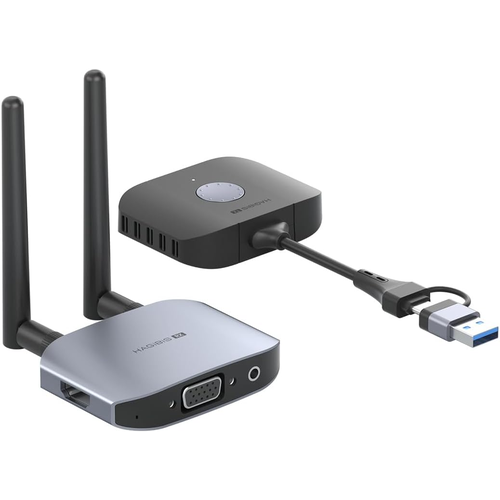
HAGIBIS G11W Wireless HDMI Transmitter & Receiver Price in Bangladesh
Share your laptop or desktop screen on a television, monitor or projector without running a long video cable using the HAGIBIS G11W Wireless HDMI Transmitter and Receiver Extender. Featuring a 2-in-1 USB-A and USB-C transmitter interface, this wireless display system is designed for compatible Windows and macOS computers. With Full HD 1080P at 60Hz output and an advertised transmission range of up to 50 meters, the G11W offers a practical solution for office presentations, classrooms, training sessions and everyday screen sharing.
The HAGIBIS G11W combines 2.4GHz and 5GHz dual-band wireless transmission with a receiver offering HDMI and VGA display outputs. This allows users to connect modern HDMI monitors and compatible older VGA projectors without relying on a long physical connection between the computer and display. A separate 3.5mm audio output supports external audio equipment, while mirror and extended display modes provide flexibility for presentations and multitasking.
Designed for shared workspaces and conference rooms, the G11W supports up to eight compatible transmitters with one receiver and provides convenient one-click disconnection and reconnection. Its external receiver antennas are intended to improve long-distance wireless connectivity, while landscape and portrait screen modes provide additional display flexibility. Explore the HAGIBIS G11W price in Bangladesh at IT Source and confirm whether you need the complete transmitter-and-receiver kit or an additional transmitter for an existing receiver.
Top Highlights
- USB-A & USB-C Dual InterfaceConnect compatible laptops and desktop computers using either transmitter connector.
- 1080P 60Hz Full HD DisplayShare presentations, documents and video on supported external displays.
- 50m Dual-Band Wireless Range2.4GHz and 5GHz transmission for flexible room layouts and reduced cable clutter.
- HDMI & VGA Dual OutputConnect compatible displays with optional 3.5mm external audio output.
About the HAGIBIS G11W Wireless HDMI Extender
The HAGIBIS G11W is a wireless display transmitter and receiver system developed for users who want to project their computer screen without installing long HDMI cables. Its transmitter features a dual USB-A and USB-C interface, making it suitable for supported Windows and macOS laptops and desktops. Unlike conventional HDMI-input wireless extenders, the G11W uses a USB-based computer connection and may require UDisplay software during initial setup, depending on the system and regional instructions. The receiver connects to a television, monitor or projector through HDMI or VGA and supports separate audio output through a 3.5mm connection. The system uses 2.4GHz and 5GHz dual-band wireless transmission, with two external receiver antennas and an advertised open-area range of up to 50 meters. Published G11W product manuals identify Full HD 1920 × 1080 output at 60Hz, making it practical for business presentations, classroom materials, training videos and general screen sharing. Mirror mode duplicates the computer's screen, while extended mode allows compatible systems to use an additional desktop area. Hagibis also advertises landscape and portrait display orientation switching, which is useful for presentations and vertical content. For multi-user environments, one G11W receiver supports switching among up to eight compatible transmitters, although only the selected source is shown at a time. A one-click disconnect and reconnect function makes it easier to pause sharing when private information should not appear on the external screen. The G11W also supports software-based projection workflows for compatible devices, subject to operating system and application requirements. It is particularly useful for offices, educational institutions, conference rooms and home workspaces where users need flexible computer-to-display connectivity. Wireless performance varies with obstacles, interference, distance and device compatibility, so the advertised 50-meter transmission range should not be treated as guaranteed in every indoor environment.
Design & Performance
2-in-1 USB-A and USB-C Transmitter Interface
The HAGIBIS G11W transmitter includes USB-A and USB-C connection options, allowing it to connect to supported computers with either interface. This makes the device useful for workspaces containing a mixture of traditional USB-A laptops and newer USB-C computers.
The transmitter operates through a USB-based display-sharing workflow rather than requiring an HDMI video output on the source computer. Compatibility depends on the operating system and software support, so the presence of a USB port alone does not guarantee operation.
1080P Full HD at 60Hz
Published G11W technical manuals identify a maximum display output of 1920 × 1080 at 60Hz. This Full HD resolution is suitable for displaying presentation slides, spreadsheets, educational materials, web content and compatible video playback on external screens.
The actual display result depends on the source computer, receiver, connection and monitor or projector. Customers requiring 4K UHD output should select a model with specifically verified 4K support rather than assuming the G11W provides that resolution.
2.4GHz and 5GHz Dual-Band Wireless Transmission
The G11W uses dual-frequency 2.4GHz and 5GHz wireless technology intended to provide a stable display connection under suitable conditions. This helps reduce dependence on long video cables and provides flexibility when arranging equipment in a meeting room or classroom.
Wireless performance can be affected by nearby networks, other electronic equipment and physical obstacles. The dual-band capability is intended to improve connection flexibility, but it does not guarantee interference-free transmission in every environment.
Up to 50-Meter Wireless Range
Hagibis advertises a transmission distance of up to 50 meters for the G11W. Its receiver uses two external antennas, making the system suitable for larger meeting rooms, training areas and other spaces where a computer may be positioned away from the display.
The advertised distance is based on favorable transmission conditions. Walls, furniture, interference and building layout can reduce the practical range, so keeping the transmitter and receiver relatively unobstructed is recommended.
HDMI and VGA Dual Display Outputs
The G11W receiver provides HDMI and VGA output connections, allowing it to work with compatible televisions, monitors and projectors. This is particularly useful in classrooms and offices that still use VGA projectors alongside modern HDMI screens.
Hagibis specifies that HDMI and VGA outputs can operate individually or simultaneously. The same receiver signal can therefore be sent to two compatible displays, subject to their resolution and connection requirements.
Separate 3.5mm Audio Output
A dedicated 3.5mm audio connection allows the receiver to connect to compatible external speakers or audio equipment. This is useful when presenting videos or other material in a classroom, meeting room or home entertainment setup.
When using VGA video output, a separate audio connection is especially relevant because VGA does not carry audio. Confirm the speaker input type and required audio cable before setting up the system.
Mirror and Extended Display Modes
Mirror mode duplicates the computer screen on an external television, monitor or projector. This makes it easy to show presentations, demonstrations and other content to an audience while working from a laptop.
Extended display mode allows compatible computers to use the external screen as an additional workspace. Users can keep notes or supporting information on their primary screen while displaying presentation material on the connected monitor.
Multiple Transmitters with One Receiver
The HAGIBIS G11W supports up to eight compatible transmitters paired with one receiver. This is useful for shared meeting rooms where different participants need to present from their own computers without repeatedly changing physical display cables.
The receiver switches between the selected transmitter sources rather than displaying eight independent desktops simultaneously. Additional transmitters must be purchased separately unless the selected kit explicitly includes them.
One-Click Privacy and Connection Control
The G11W provides a one-click function for disconnecting and reconnecting the screen-sharing session. This allows presenters to stop displaying their computer screen temporarily when confidential or unrelated information needs to remain private.
Hagibis also advertises automatic reconnection, helping users resume their presentation conveniently. The available control behavior can depend on the installed software version and the connection mode in use.
Landscape and Portrait Display Orientation
The G11W supports landscape and portrait screen orientation workflows. Landscape mode is useful for office documents and presentations, while portrait mode can be suitable for vertical video and other supported display content.
Orientation switching depends on the connected computer, display and software settings. Confirm that the required display rotation is supported by the operating system and monitor configuration.
Who It's For
The HAGIBIS G11W Wireless HDMI Transmitter and Receiver Extender is suitable for teachers, office professionals, business presenters, corporate trainers, educational institutions, conference-room administrators and home users who want convenient wireless screen sharing. Its USB-A and USB-C transmitter interface is particularly useful for workplaces with different computer generations, while HDMI and VGA receiver outputs support modern and legacy display equipment. The mirror and extended display modes help with presentations and multitasking, and multi-transmitter switching makes it practical for shared meeting spaces. Users should confirm operating system and software compatibility before purchasing, especially when planning to use the device with computers managed by organizational IT policies.
Simple Buying Guide
Before purchasing the HAGIBIS G11W, confirm whether your supplier offers the complete transmitter-and-receiver kit or a transmitter-only variant. Check that your computer runs a supported version of Windows or macOS and has a usable USB-A or USB-C port. The regional Hagibis distributor identifies Windows 10 version 1607 or later, Windows 11 and macOS 10.15.7 or later as supported systems. Verify that the destination display provides HDMI or VGA input and that receiver power is available. Consider whether you need mirror mode, extended display operation, external audio or multiple transmitters. If software installation is restricted on your computer, confirm UDisplay installation requirements before ordering.
Easy Steps to Check Before You Order
First, identify your computer's operating system and available USB-A or USB-C connection. Next, check whether your monitor, television or projector accepts HDMI or VGA input. Confirm the selected G11W variant and whether it includes the receiver required for a complete wireless display connection. Review the 1080P 60Hz output, 50-meter advertised wireless range, 2.4GHz/5GHz transmission and UDisplay software requirements. If you plan to share the receiver among several presenters, confirm the number of compatible transmitters required. Finally, verify the current price, stock availability and applicable warranty terms with IT Source Bangladesh.
Why Buy From IT Source?
Explore the HAGIBIS G11W Wireless HDMI Transmitter and Receiver Extender at IT Source Bangladesh and choose a flexible screen-sharing solution for work, education and entertainment. Review the USB-A/USB-C transmitter connection, HDMI/VGA receiver outputs, Full HD video support and multi-user switching capability before ordering. Confirm whether you are purchasing a complete kit or a separate transmitter, and verify compatibility with your computer's operating system. The G11W provides a convenient way to connect supported computers to larger displays while reducing the need for long video cables.
Frequently Asked Questions
Does the HAGIBIS G11W support both USB-A and USB-C computers?
Yes. Its transmitter provides USB-A and USB-C interface options for compatible Windows and macOS computers. Operating system and software compatibility must still be checked before use.
Does the HAGIBIS G11W require driver or software installation?
The main Hagibis product page describes plug-and-play operation, but the regional distributor specifies UDisplay software installation during initial setup. Confirm the required setup for your operating system and product version.
Can the HAGIBIS G11W connect to HDMI and VGA displays?
Yes. The receiver supports HDMI and VGA outputs, which Hagibis says can operate separately or simultaneously. The receiver also provides a 3.5mm connection for compatible external audio equipment.
Check the latest HAGIBIS G11W price in Bangladesh.
Connect your computer to a larger display wirelessly with Hagibis at IT Source.