
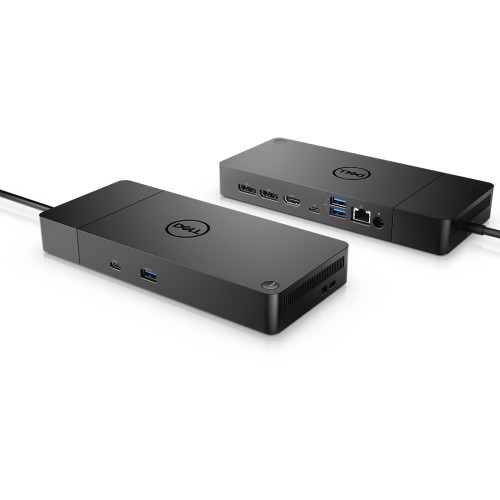
| Product Specifications | |
|---|---|
| Tech Specs | |
| Product Type | USB-C Docking Station |
| Host Connection | USB-C with DisplayPort Alt Mode |
| Power Adapter | 180W |
| Dell Laptop Charging | Up to 130W |
| Non-Dell Laptop Charging | Up to 90W |
| DisplayPort | 2 × DP 1.4 |
| HDMI | 1 × HDMI 2.0 |
| USB-C Video | 1 × USB-C with DP 1.4 |
| USB-A | 3 × USB 3.2 Gen 1 |
| USB-C Data | 1 × USB 3.2 Gen 2 (front) |
| Ethernet | 1 × Gigabit RJ45 |
| Maximum Display Support | Dual 4K 60Hz or Triple QHD 60Hz, host-dependent |
| USB-C Host Cable | 1m Integrated |
| Dimensions | 205 × 90 × 29mm |
| Dock Weight | Approximately 585g |
| Color | Black |
| Compatibility | Selected Dell and non-Dell USB-C laptops |
| Warranty Information | |
| Warranty | N/A |
Looking for the Dell WD19S USB-C Docking Station with 180W Power Adapter price in Bangladesh? This professional Dell docking station is designed to expand laptop connectivity and create an organized workstation with external displays, USB accessories and wired networking.
The Dell WD19S 180W features two DisplayPort 1.4 outputs, HDMI 2.0, USB-C video connectivity, multiple USB-A and USB-C ports, and Gigabit Ethernet. It supports up to 130W power delivery to compatible Dell laptops and up to 90W to supported non-Dell USB-C laptops.
Whether you are setting up a home office, business workstation or multi-monitor desk, the Dell WD19S provides convenient single-cable connectivity. Check the latest price and availability at IT Source Bangladesh.
The Dell WD19S is a modular USB-C docking station designed for compatible Dell business laptops and other supported USB-C computers.
It expands the number of available ports and helps users connect essential desktop accessories through a single laptop cable.
The docking station is suitable for office environments where external monitors, keyboards, mice, USB storage devices and wired network connections are frequently used.
Its integrated USB-C host cable simplifies the process of connecting and disconnecting a laptop from a desk setup.
The included 180W power adapter supplies the dock and enables up to 130W laptop charging on supported Dell systems.
For compatible non-Dell laptops, the dock provides up to 90W through standard USB Power Delivery.
Multiple display outputs support flexible monitor arrangements, although the actual number and resolution of monitors depend on the laptop's graphics hardware.
The dock also includes a Gigabit Ethernet port for reliable wired network connectivity.
Its compact black enclosure and modular design make it a practical addition to professional workstations.
The WD19S is particularly useful for users who regularly move between a mobile laptop setup and a full desktop workspace.
The Dell WD19S connects to a compatible laptop through an integrated USB-C cable.
This single connection carries supported display signals, USB data, networking and laptop charging.
It reduces the number of cables that must be connected individually whenever a laptop is placed on a desk.
Users can leave monitors, keyboards, mice and Ethernet connected to the docking station.
Connecting the laptop then becomes more convenient for everyday office use.
The laptop must support the required USB-C DisplayPort Alt Mode and power features for full functionality.
The Dell WD19S 180W package uses a 180W external power adapter.
This adapter supplies power to the docking station and its connected accessories.
With a compatible Dell laptop, the dock can provide up to 130W of laptop charging power.
This is useful for supported Dell business laptops that require more than standard 90W USB-C charging.
The 180W rating refers to the power adapter capacity, not the amount delivered directly to the laptop.
Charging capability depends on the connected laptop and Dell's supported power configurations.
The WD19S also supports compatible laptops from other manufacturers.
For non-Dell USB-C systems, the dock provides up to 90W through USB Power Delivery.
This can power or charge supported laptops while they are connected to external accessories.
The connected laptop must support charging through its USB-C port.
Some laptops may require more power than the dock can supply.
Charging behavior and other dock features can vary between laptop manufacturers.
The Dell WD19S includes two DisplayPort 1.4 connectors.
These ports allow compatible external monitors to connect directly to the docking station.
DisplayPort is useful for business monitors, professional displays and multi-monitor workstations.
Users can extend their desktop across supported monitors to work with multiple applications.
Maximum resolution and refresh rate depend on the laptop's DisplayPort bandwidth and graphics capabilities.
Appropriate monitor cables and compatible display hardware are required.
The docking station includes one HDMI 2.0 video output.
This allows users to connect compatible HDMI monitors and displays.
HDMI is convenient for office monitors, conference-room screens and many desktop display setups.
It provides an alternative to the dock's DisplayPort connectors.
However, the rear HDMI and USB-C DisplayPort video outputs share a display path.
They cannot be used simultaneously as two independent monitor outputs.
The WD19S includes a rear USB-C port supporting DisplayPort 1.4 video output.
This port can connect compatible USB-C monitors or suitable display adapters.
It offers additional flexibility when selecting monitor connections.
The port also supports USB data connectivity.
Because this USB-C video output shares a display path with HDMI, only one of these two ports can drive a display at a time.
Users should plan their monitor connections accordingly.
On compatible laptops with sufficient DisplayPort bandwidth and Display Stream Compression support, the WD19S can operate two external 4K monitors at up to 60Hz.
This provides a high-resolution workspace for spreadsheets, documents and professional applications.
Dual-monitor setups make it easier to compare files or keep several windows visible.
Actual display performance depends on the laptop's GPU, USB-C display capabilities and monitor configuration.
Systems with lower display bandwidth may support reduced resolutions or refresh rates.
Dual 4K 60Hz output should not be assumed for every compatible USB-C laptop.
The Dell WD19S can support three external monitors on suitable host systems.
Dell specifies up to triple QHD 2560 x 1440 resolution at 60Hz for supported DisplayPort HBR3 systems with DSC.
This can provide additional screen space for business applications and multitasking.
Users can organize communication tools, documents and data across multiple displays.
Some laptops may support only lower resolutions when three monitors are connected.
Always verify the host system's graphics and display bandwidth before planning a multi-monitor workstation.
The Dell WD19S includes three USB-A 3.2 Gen 1 ports.
Two USB-A ports are located on the rear of the dock.
An additional front USB-A port supports Dell PowerShare functionality.
These connections are useful for keyboards, mice, flash drives and other compatible USB peripherals.
USB 3.2 Gen 1 supports data transfer rates of up to 5Gbps.
Actual transfer speed depends on the connected device and host system.
The docking station includes a front USB-C 3.2 Gen 2 port.
This connection is useful for compatible USB-C storage devices and accessories.
USB 3.2 Gen 2 supports data transfer speeds of up to 10Gbps under suitable conditions.
The front-facing location makes it convenient to connect frequently used devices.
Actual performance depends on the USB device, cable and laptop.
This front USB-C port is intended for peripherals and is not the dock's main laptop connection.
The Dell WD19S includes an RJ45 Gigabit Ethernet port.
This allows a compatible laptop to connect to a wired network through the dock.
Wired Ethernet is useful for office networks, large file transfers and stable connectivity.
The port supports standard 10/100/1000Mbps Ethernet networking.
Network performance depends on the router, switch, cable and internet connection.
Some Dell enterprise networking features require a supported Dell laptop.
The WD19S supports selected enterprise management features.
These include Wake-on-LAN and MAC Address Pass-Through on compatible Dell systems.
Wake-on-LAN can help administrators remotely wake supported computers.
MAC Address Pass-Through can simplify network identification in managed business environments.
Availability depends on the laptop, BIOS configuration and operating system.
These features are not guaranteed on every non-Dell laptop.
The Dell WD19S features an integrated power button.
On supported Dell laptops, the dock button can replicate the system power button.
This allows users to power on or wake a compatible laptop without opening its lid.
It is useful for desks where the laptop is placed in a stand or kept closed.
The power button may not function with unsupported Dell or non-Dell systems.
Check the laptop's compatibility before relying on this feature.
The Dell WD19S uses a modular docking station design.
Its architecture allows certain dock modules to be serviced or upgraded using compatible Dell components.
This can be useful for organizations managing multiple docking stations.
It also provides flexibility compared with some fixed-design docking solutions.
Module compatibility and upgrade availability depend on Dell's supported accessories.
Replacement or upgrade modules are not automatically included with the docking station.
The WD19S includes security lock slot options.
These include a Noble Wedge-style slot and a Kensington security slot.
Compatible locking accessories can help secure the dock to a workstation.
This is useful in offices, classrooms and shared workspaces.
Security cables and locks are sold separately unless otherwise specified.
Choose a lock compatible with the selected slot.
The Dell WD19S features a compact black enclosure.
It measures approximately 205 x 90 x 29mm.
Its docking station weight is approximately 585g.
The compact footprint helps keep desk space available for other accessories.
Its integrated USB-C cable is approximately 1 meter long.
This makes it suitable for a variety of laptop and monitor arrangements.
Dell lists support for selected Windows and Linux operating systems.
Supported environments include Windows 10, Windows 11, Ubuntu and Red Hat Enterprise Linux.
Actual functionality depends on the connected laptop and available drivers.
Some features, including enterprise management and dock power-button operation, may be Dell-specific.
Display behavior may also vary between operating systems.
For the best experience, keep the laptop's BIOS, graphics drivers and dock firmware updated.
The Dell WD19S is a USB-C docking station, not a Thunderbolt-only dock.
For external monitor functionality, the laptop's USB-C port must support DisplayPort Alt Mode.
For laptop charging, the host must support the appropriate USB-C power delivery arrangement.
A USB-C port that supports only data transfer may not provide full docking functionality.
Monitor resolution and the number of displays depend on the laptop's graphics capabilities.
Confirm the exact laptop model before purchasing.
The Dell WD19S is an updated version of the original WD19 docking station.
Both models offer USB-C docking, external display outputs, USB connections and Gigabit Ethernet.
However, the WD19S does not include the dedicated 3.5mm audio ports found on the original WD19.
Users who need a headset connection can use the laptop's audio port or a compatible USB audio accessory.
This difference is important when selecting a dock for an office workstation.
Check the required ports before ordering.
The Dell WD19S 180W is ideal for office professionals who need multiple monitors, wired networking and convenient laptop charging.
Business organizations can use the dock to create standardized workstations for compatible Dell Latitude and Precision laptops.
Home-office users can connect keyboards, mice, external storage and monitors without repeatedly attaching several cables.
Students and remote workers can benefit from a more organized desk setup and additional display space.
Users of compatible non-Dell USB-C laptops can also use supported docking functions, subject to charging and display limitations.
The Dell WD19S 180W retail configuration typically includes the docking station with integrated USB-C cable, 180W AC power adapter, AC power cord and product documentation.
Package contents may vary by region and product condition. For replacement, refurbished or open-box stock, confirm that the 180W adapter and AC power cord are included.
IT Source offers docking stations, laptop accessories and computer connectivity products for customers in Bangladesh.
Customers can verify their laptop's USB-C capabilities, charging requirements and external monitor support before selecting a docking station.
Contact IT Source to confirm current price, availability, included power adapter, product condition and applicable warranty terms.
No. The included power adapter is rated at 180W. The docking station delivers up to 130W to compatible Dell laptops and up to 90W to supported non-Dell USB-C laptops.
Yes. The WD19S supports up to two external 4K monitors at 60Hz when the connected laptop provides sufficient DisplayPort bandwidth and DSC support. Lower-capability systems may be limited to reduced resolutions or refresh rates.
Check IT Source for the latest Dell WD19S USB-C Docking Station with 180W Power Adapter price and availability in Bangladesh. Confirm laptop compatibility, included accessories and warranty before purchasing.
Check the latest price and availability at IT Source.
Build a cleaner workstation with multi-monitor connectivity, Gigabit Ethernet, USB expansion and up to 130W Dell laptop charging.
Get specific details about this product from customers who own it.