
| Product Specifications | |
|---|---|
| Tech Specs | |
| Product Type | Dual-Bay HDD/SSD Docking Station |
| Drive Bays | 2 |
| Compatible Drives | 2.5-inch and 3.5-inch SATA HDD/SSD |
| Internal Interface | SATA |
| Computer Interface | USB 3.0 / 5Gbps |
| Offline Cloning | Supported |
| Clone Progress Indicators | 25%, 50%, 75%, 100% |
| Installation | Vertical, tool-free drive insertion |
| Power Supply | DC 12V/3A |
| USB Cable Connection | USB-A to USB-A |
| Operating System | Windows, Linux, macOS |
| Housing Material | ABS |
| Compatible Devices | Computers with supported USB connections |
| Warranty Information | |
| Warranty | N/A |
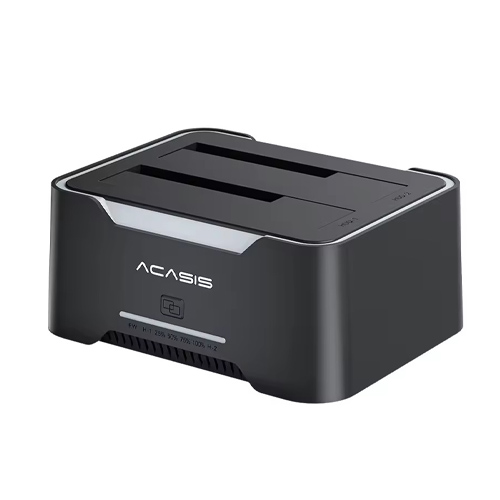
The ACASIS EC-6104 is a dual-bay SATA hard drive docking station for connecting compatible 2.5-inch and 3.5-inch HDDs and SSDs to a computer. Its USB 3.0 interface, vertical drive slots and offline cloning function make storage access and data migration more convenient.
With LED clone-progress indicators and a 12V/3A external power adapter, the EC-6104 is suitable for computer maintenance, file backup and drive replacement. Explore the ACASIS EC-6104 price in Bangladesh at IT Source.
The ACASIS EC-6104 is a dual-bay HDD and SSD docking station designed for convenient external access to SATA storage drives. It supports compatible 2.5-inch and 3.5-inch SATA hard drives and solid-state drives, making it useful for computer upgrades and data management.
Two vertical drive slots allow compatible drives to be inserted directly into the docking station. Users can access connected storage through USB or use the dedicated offline cloning function to duplicate a source drive to a target drive without connecting the dock to a computer.
The EC-6104 includes power and cloning controls, LED progress indicators and a 12V/3A power connection. Its open-top design provides convenient access when working with multiple SATA drives.
The EC-6104 provides two drive bays for compatible 2.5-inch and 3.5-inch SATA HDDs and SSDs. This allows users to connect storage drives externally instead of repeatedly opening a desktop computer case.
The docking station is useful for transferring files between drives, checking older disks and accessing storage removed from computers. It is designed for SATA drives and does not accept M.2 NVMe SSDs directly.
The EC-6104 connects to a computer through USB, allowing supported SATA drives to be accessed as external storage. USB 3.0 connectivity is suitable for routine file transfers, data backup and storage maintenance.
Actual transfer performance depends on the installed HDD or SSD, computer USB port and file workload. A fast USB connection does not increase the physical read or write speed of the installed drive.
The EC-6104 supports independent offline cloning, allowing one SATA drive to be duplicated to another without connecting the docking station to a computer. This is useful when replacing an older drive or preparing a storage backup.
Insert the source and target drives into their designated slots and follow the cloning procedure. The target drive must have capacity equal to or greater than the source drive. Cloning overwrites the target drive, so important files must be backed up beforehand.
The docking station features LED indicators that display device activity and cloning progress. During offline cloning, the progress indicators show 25%, 50%, 75% and 100% completion stages.
These visual indicators make it easier to monitor a cloning operation without using computer software. Avoid disconnecting the power supply or removing either drive while cloning is in progress.
The EC-6104 uses a vertical docking design that allows compatible SATA drives to be inserted directly into the two slots. This arrangement is practical for technicians who frequently work with different hard drives.
The open-top structure allows convenient drive access and exposes the drives to surrounding air. Users should place the docking station on a stable surface and avoid moving connected drives during operation.
The EC-6104 operates using a 12V/3A external power adapter, providing the power required for supported 2.5-inch and 3.5-inch SATA drives. Its power button allows users to control the docking station directly.
The model-specific manual lists compatibility with Windows, Linux and Mac OS 10.2 or later. Connect the dock to a compatible computer using its USB connection for storage access, or disconnect USB when performing independent offline cloning.
IT Technicians: Access and test SATA storage drives. Desktop Users: Transfer files from old HDDs and SSDs. Office Professionals: Manage external storage and backups. Computer Repair Shops: Clone drives during upgrades. Content Creators: Access archived files on compatible SATA drives.
IT Source offers ACASIS storage accessories and connectivity products for customers in Bangladesh. Check the latest EC-6104 price, availability and applicable warranty before ordering. Confirm your drive interface, storage capacity and cloning requirements to choose the appropriate docking station.
Buy ACASIS EC-6104 Dual-Bay SATA Docking Station from IT Source Bangladesh
Access two SATA drives and perform convenient offline cloning with a powered dual-bay docking station.
Get specific details about this product from customers who own it.