
| Product Specifications | |
|---|---|
| Tech Specs | |
| Product Type | DisplayPort to HDMI Cable |
| Cable Length | 1.8 Meters (6 Feet) |
| Input Connector | DisplayPort Male |
| Output Connector | HDMI Male |
| DisplayPort Version | 1.2 |
| HDMI Version | 1.3 |
| Maximum Resolution | 1920 × 1080 (Full HD) |
| 3D Video Support | Yes |
| Audio Support | Multichannel Digital Audio |
| Cable Jacket | PVC |
| Connection Direction | DisplayPort to HDMI |
| Compatible Source Devices | Computers with full-size DisplayPort output |
| Compatible Displays | HDMI monitors, televisions and projectors |
| Warranty Information | |
| Warranty | N/A |
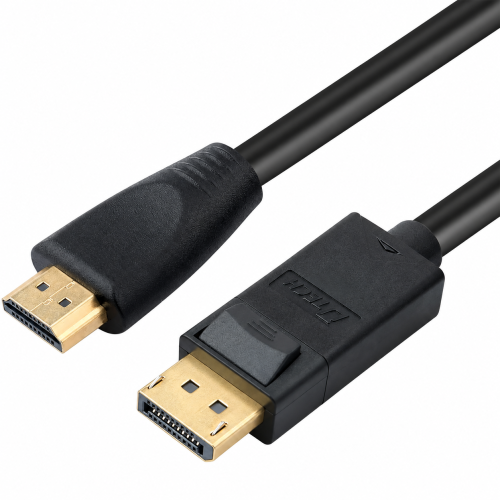
The DTECH DT-CU0305 1.8M DisplayPort to HDMI Cable connects compatible DisplayPort computers to HDMI monitors, TVs and projectors. Supporting Full HD 1080p, 3D video and digital audio, it provides a convenient solution for everyday external display connectivity.
Its 1.8-meter length and male-to-male connector design make it suitable for desktop workstations, presentations and multimedia setups. Explore the DTECH DT-CU0305 1.8M price in Bangladesh at IT Source.
The DTECH DT-CU0305 is a DisplayPort-to-HDMI cable designed to connect compatible desktop computers, laptops and workstations to HDMI displays. It is useful when a computer provides a full-size DisplayPort video output but the receiving monitor or projector uses HDMI.
The 1.8-meter version supports Full HD 1920×1080 video, compatible 3D formats and multichannel digital audio. Exact-model supplier specifications identify DisplayPort 1.2 and HDMI 1.3 interfaces.
Its integrated DisplayPort male and HDMI male connectors provide a direct connection without requiring an additional HDMI cable. The cable is intended for DisplayPort-source-to-HDMI-display operation.
The DT-CU0305 features a full-size DisplayPort male connector at one end and an HDMI male connector at the other. It allows compatible computers and graphics cards to connect directly to HDMI monitors, televisions and projectors.
The cable is designed for DisplayPort output to HDMI input. It is not reversible and should not be used to connect an HDMI computer output to a DisplayPort-only monitor.
The 1.8-meter DT-CU0305 supports Full HD resolution up to 1920×1080. It provides suitable video output for documents, spreadsheets, presentations, streaming content and everyday computer use.
One exact-model supplier lists 1080p at 100Hz, although this refresh rate is not consistently confirmed across supplier specifications. Actual refresh-rate support depends on the cable variant, computer graphics output and receiving display.
With a cable length of 1.8 meters, approximately six feet, the DT-CU0305 provides practical reach between a computer and an external display. It is suitable for workstations where the monitor is positioned near the desktop or computer tower.
The integrated male-to-male design avoids the need for a separate HDMI adapter and cable combination. Confirm the required installation distance before purchasing.
The cable supports digital video and multichannel audio transmission between compatible DisplayPort sources and HDMI receiving devices. This allows supported televisions and monitors to receive picture and sound through one connection.
It also supports compatible 3D video content. Audio and 3D playback depend on the graphics hardware, source material, operating system settings and connected display capabilities.
Exact-model supplier specifications list DisplayPort 1.2 input and HDMI 1.3 output compatibility. These interfaces provide the connection required for supported Full HD video and digital audio transmission.
The source device must have a full-size DisplayPort output. Mini DisplayPort and USB-C ports use different connector types and cannot accept this cable directly.
The DT-CU0305 is suitable for connecting office computers, workstations and compatible laptops to HDMI monitors or projectors. It can be used for mirrored presentations or extended desktop arrangements when supported by the computer's graphics system.
Connect the DisplayPort end to the source and the HDMI end to the receiving display. Select the appropriate HDMI input and configure the computer's display settings for the required resolution and screen arrangement.
Office Users: Connect DisplayPort computers to HDMI monitors. IT Technicians: Configure compatible desktop displays. Teachers and Presenters: Connect computers to HDMI projectors. Home Users: Display computer content on HDMI televisions. Workstation Users: Add compatible external screens for everyday productivity.
IT Source offers DTECH display cables and connectivity accessories for customers in Bangladesh. Check the latest DT-CU0305 1.8M price, availability and applicable warranty before ordering. Confirm the cable length, connector types and required display resolution to select the correct version.
Buy DTECH DT-CU0305 1.8M DisplayPort to HDMI Cable from IT Source Bangladesh
Connect compatible DisplayPort computers to HDMI displays with Full HD video and digital audio support.
Get specific details about this product from customers who own it.