
| Product Specifications | |
|---|---|
| Tech Specs | |
| Product Type | DisplayPort to VGA Converter Cable |
| Cable Length | 1.8 Meters |
| Input Connector | DisplayPort Male |
| Output Connector | VGA Male |
| Signal Direction | DisplayPort to VGA |
| Maximum Resolution | 1920 × 1200 |
| Full HD Support | 1920 × 1080 |
| Video Refresh Rate | 1080p@60Hz |
| Signal Conversion | Digital DisplayPort to Analog VGA |
| Audio Support | No, VGA is video-only |
| Cable Material | PVC |
| Color | Black |
| Special Features | Compatible Source Devices: PCs and laptops with full-size DisplayPort output Compatible Display Devices: VGA monitors and projectors |
| Warranty Information | |
| Warranty | N/A |
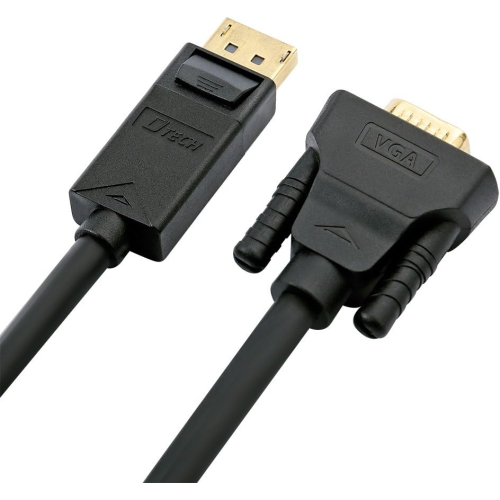
The DTECH DT-CU0307 is a 1.8-meter DisplayPort to VGA cable designed to connect compatible computers to VGA monitors and projectors. Supporting Full HD 1080p video, it offers a practical way to connect modern DisplayPort outputs to existing analog displays.
Its direct male-to-male design, black PVC jacket and convenient cable length make it useful for offices, classrooms and home workstations. Explore the DTECH DT-CU0307 1.8M price in Bangladesh at IT Source.
The DTECH DT-CU0307 is a DisplayPort to VGA converter cable for connecting computers with full-size DisplayPort outputs to monitors and projectors with VGA inputs. It is especially useful when an existing display does not provide a modern digital video connection.
The cable converts a digital DisplayPort video signal into an analog VGA signal and supports Full HD 1920x1080 output. Its 1.8-meter length provides convenient reach for common desk and presentation arrangements.
With male connectors at both ends and a black PVC jacket, the DT-CU0307 provides a straightforward connection for office computers, desktop workstations and educational display systems.
The DT-CU0307 allows a DisplayPort-equipped computer to connect directly to a VGA monitor or projector. It converts the digital video signal from the DisplayPort output into the analog signal required by the VGA input.
The cable works from DisplayPort source to VGA display. It is not designed to convert a VGA computer output into a DisplayPort monitor input.
The cable supports Full HD 1920x1080 video output, making it suitable for office applications, presentations, web browsing and everyday desktop use. Some exact-model supplier specifications also list resolutions up to 1920x1200.
Actual resolution depends on the computer graphics output and receiving VGA display. VGA is an analog interface, so picture quality may also depend on the monitor and connection conditions.
The 1.8-meter length provides practical reach between a computer and a nearby monitor or projector. It is suitable for common workstation arrangements without requiring an additional VGA extension cable.
The cable can be routed behind desks or along display stands. Avoid excessive tension, sharp bends and pressure around the connector ends.
The DT-CU0307 features a full-size DisplayPort male connector at the source end and a VGA male connector at the display end. This eliminates the need to combine a separate DP-to-VGA adapter with another VGA cable.
Check both devices before ordering. HDMI, Mini DisplayPort and USB-C ports are different interfaces and cannot be connected directly using this cable.
The cable helps extend the usefulness of VGA monitors and projectors when upgrading to a computer equipped with DisplayPort. It is useful in offices, schools and businesses where existing analog display equipment remains in service.
Compatible systems may support extended or mirrored desktop operation through their display settings. Available modes depend on the graphics hardware and operating system.
VGA carries video signals but does not transmit audio. The DT-CU0307 should therefore be used for display output, while speakers or other audio equipment require a separate audio connection.
Connect the DisplayPort end to the computer and the VGA end to the monitor or projector. Select the appropriate display input and configure the desired resolution using the computer's display settings.
Office Users: Connect DisplayPort desktops to VGA monitors. Teachers: Use existing VGA projectors for presentations. IT Technicians: Maintain compatibility with older displays. Home Users: Connect a modern PC to a VGA screen. Businesses: Continue using functional VGA display equipment during computer upgrades.
IT Source offers DTECH display cables and computer connectivity accessories for customers in Bangladesh. Check the latest DT-CU0307 1.8M price, stock availability and applicable warranty before ordering. Confirm the DisplayPort output, VGA input and required cable length to select the correct connection.
Buy DTECH DT-CU0307 1.8M DisplayPort to VGA Cable from IT Source Bangladesh
Connect compatible DisplayPort computers to VGA monitors and projectors with Full HD video support.
Get specific details about this product from customers who own it.