
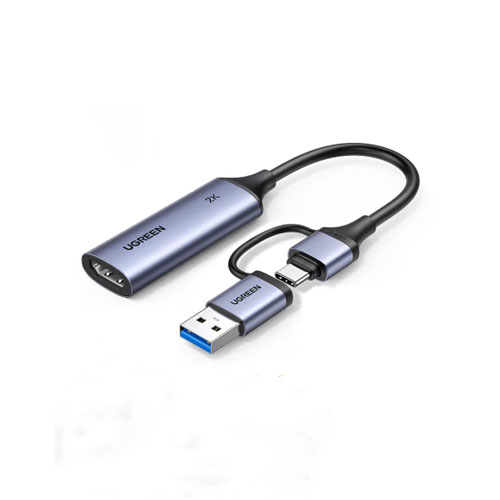
| Product Specifications | |
|---|---|
| Tech Specs | |
| Product Type | HDMI Video Capture Card |
| Video Input | 1 × HDMI |
| Maximum HDMI Input | 4K 30Hz |
| Maximum Capture Resolution | 2K 30fps |
| Full HD Capture | Up to 1080p 60fps |
| Host Connection | USB-A / USB-C |
| USB Interface | USB 3.0, up to 5Gbps |
| Video Formats | MJPEG / YUY2 |
| Audio Capture | HDMI Audio, up to 24-bit / 48kHz |
| HDMI Passthrough | Not Available |
| Housing | Aluminum Alloy |
| Driver Installation | Plug-and-Play on Supported Systems |
| Compatible Systems | Windows, macOS, Linux, Compatible Android Devices, iPadOS 17+ |
| Compatible Software | OBS Studio, XSplit, PotPlayer, QuickTime Player |
| Power | USB Powered |
| Product Code | 15389 |
| Warranty Information | |
| Warranty | N/A |
Looking for the UGREEN CM629 (15389) HDMI Video Capture Card price in Bangladesh? This compact HDMI-to-USB capture device is designed for gamers, live streamers, content creators, teachers and professionals who want to record video from compatible HDMI equipment.
The UGREEN CM629 supports 4K 30Hz HDMI input, video capture up to 2K 30fps and smooth Full HD 1080p 60fps recording. Its dual USB-A and USB-C connectors provide convenient compatibility with supported laptops, desktop computers, tablets and mobile devices.
Whether you want to record PlayStation gameplay, stream Nintendo Switch videos, capture footage from an HDMI camera or create online tutorials, the CM629 offers practical recording functionality. Check the latest price and availability at IT Source Bangladesh.
The UGREEN CM629 is an external HDMI video capture card designed for recording and streaming video from compatible HDMI sources.
It connects gaming consoles, cameras, computers and other supported HDMI devices to a USB host.
The HDMI input supports video resolutions up to 3840 x 2160 at 30Hz.
Captured video can reach 2K resolution at 30 frames per second on supported systems.
For users who prefer smoother motion, the device also supports Full HD recording at up to 1080p 60fps.
The integrated USB-A and USB-C connector design offers flexible connection options without requiring separate USB connector adapters.
Its USB 3.0 interface provides high-speed video and audio transfer to a compatible host.
Embedded HDMI audio can be captured alongside video, helping creators record gameplay sound and camera audio.
The aluminum alloy housing offers a durable exterior and helps dissipate heat during extended use.
Driver-free operation on supported systems makes the capture card suitable for beginners and experienced users.
Compatibility with popular recording applications provides flexibility for gaming, streaming, online teaching and video production.
The UGREEN CM629 supports HDMI input resolutions up to 4K at 30Hz.
This allows compatible cameras, gaming consoles and computers to supply a high-resolution HDMI video signal.
The capture card processes the incoming signal for supported USB recording modes.
Users should select an HDMI output format compatible with the capture card.
The 4K HDMI input specification does not mean the device records video in 4K.
The CM629 supports video capture up to 2K at 30 frames per second.
This provides a higher-resolution recording option for compatible streaming and content creation applications.
It is useful for product demonstrations, tutorials, presentations and supported camera recording workflows.
The host computer must support the selected resolution and capture format.
Actual performance depends on USB bandwidth, recording software and system resources.
The UGREEN CM629 also supports Full HD video capture at up to 60 frames per second.
This mode is particularly useful for recording gameplay and other fast-moving content.
Recording at 60fps can produce smoother motion than 30fps when the source provides a compatible signal.
Users can select the supported resolution and frame rate in their capture application.
For reliable performance, a suitable USB 3.0 host connection is recommended.
The CM629 features both USB-A and USB-C host connection options.
This makes it convenient for use with compatible desktop computers, laptops and selected mobile devices.
USB-A is useful for traditional computer ports, while USB-C supports many modern devices.
Only one host connection should be used at a time.
The receiving device must support USB video capture functionality.
The UGREEN CM629 uses USB 3.0 technology with theoretical interface speeds up to 5Gbps.
This provides the data connection required for supported high-resolution capture modes.
A compatible USB 3.0 port is recommended for 2K and high-frame-rate Full HD recording.
USB 2.0-only connections may limit the available capture modes or performance.
The maximum USB interface speed should not be confused with the recorded video bitrate.
The CM629 captures compatible audio embedded in the incoming HDMI signal.
This allows gameplay sound, camera audio and presentation audio to accompany the recorded video.
Published specifications list audio sampling support up to 24-bit at 48kHz.
Recording software may require users to select the appropriate audio input.
Testing audio and video synchronization before an important recording is recommended.
The UGREEN CM629 supports MJPEG video capture.
MJPEG compresses individual video frames and is commonly supported by USB capture applications.
It can help manage bandwidth requirements for higher-resolution recording modes.
Available resolutions and frame rates depend on the capture application and host device.
Users should select a suitable format according to their recording requirements.
Published CM629 specifications also list YUY2 video format support.
Different video formats may offer different combinations of resolution, frame rate and processing requirements.
RGB and YCbCr color representations are listed for compatible HDMI signals.
Actual format availability depends on the connected device and recording software.
Users should check the capture settings displayed by their application.
The UGREEN CM629 works with supported versions of OBS Studio.
Users can add the device as a video capture source for recording or live streaming.
OBS Studio can combine the incoming video with microphones, overlays and other sources.
This makes the capture card useful for gaming streams, educational content and product demonstrations.
Final video quality depends on the selected capture settings, encoder and host computer.
The CM629 is also compatible with supported applications such as XSplit, PotPlayer and QuickTime Player.
These programs provide different options for displaying, recording and processing captured video.
Users can select software according to their operating system and intended workflow.
Some applications may require manual video format or audio input selection.
Always test the setup before an important recording or broadcast.
The UGREEN CM629 can capture compatible gameplay from PlayStation 5 and PlayStation 4 consoles.
Connect the console's HDMI output to the capture card's HDMI input.
Connect the USB-A or USB-C host connector to a compatible recording device.
Supported software can then receive the gameplay video for recording or streaming.
HDCP-protected content cannot be captured, and permitted gameplay recording may require disabling HDCP in the console settings.
The CM629 supports compatible HDMI gameplay capture from Xbox consoles.
It can be used to create gaming highlights, tutorials and live streaming content.
The capture card transfers supported video and audio to a connected computer.
Recording resolution depends on the selected capture mode and source settings.
Protected video content may be unavailable for capture.
The UGREEN CM629 can capture HDMI gameplay from compatible Nintendo Switch systems.
A suitable HDMI-output dock is required for dock-based Switch models.
The HDMI cable connects the console dock to the capture card.
The USB connector transfers the incoming video to compatible recording software.
Users can create gameplay recordings, tutorials and supported live streams.
The CM629 can receive HDMI video from compatible DSLR and mirrorless cameras.
This is useful for online classes, product reviews, demonstrations and live streaming.
Users can connect a camera's HDMI output to the capture card and receive video through a compatible computer or tablet.
A clean HDMI output setting is recommended when users want video without camera menu overlays.
Camera output format and compatibility should be checked before purchasing.
The UGREEN CM629 supports compatible Windows computers.
Published documentation lists Windows 8.1, Windows 10 and Windows 11 among supported operating systems.
The capture card is designed to work without dedicated proprietary drivers on supported systems.
Users can select the capture device in compatible recording software.
Suitable USB bandwidth and computer performance are important for high-resolution recording.
The CM629 also supports compatible macOS and Linux systems.
Supported applications can receive HDMI video through the USB capture connection.
Available resolutions, frame rates and audio settings depend on software compatibility.
Some applications may require manual selection of the video format.
Users should confirm their intended recording workflow before use.
The UGREEN CM629 can be used with compatible Android phones and tablets that support USB video capture.
A suitable USB camera or capture application is required.
This can allow supported mobile devices to display external HDMI video.
Actual capture and recording capabilities depend on the device and application.
Not every Android phone or tablet supports every resolution or frame rate.
The CM629 is also listed as compatible with supported iPads running iPadOS 17 or later.
Compatible capture applications can receive external HDMI video through the USB-C connection.
This can be useful for portable camera monitoring and supported video viewing workflows.
The iPad must support the required USB video capture functionality.
Compatibility with a specific iPad model and application should be confirmed before purchase.
The UGREEN CM629 is designed for convenient plug-and-play operation.
Connect an HDMI source to the capture card's HDMI input.
Connect the integrated USB-A or USB-C connector to a compatible host device.
Open a supported recording application and select the capture card as the video source.
Configure the desired resolution, frame rate and audio settings before recording.
The CM629 features a compact aluminum alloy housing.
The metallic enclosure provides a durable exterior for regular use.
Aluminum construction helps dissipate heat generated during operation.
Its compact design is suitable for desktop workstations and portable recording setups.
Keep the device away from excessive heat and moisture during use.
The capture card receives operating power through its USB host connection.
A separate external power adapter is not normally required.
This helps simplify the recording setup and reduces cable clutter.
The connected host must provide sufficient USB power for reliable operation.
The device is not intended to charge laptops or tablets through USB-C Power Delivery.
The UGREEN CM629 can help teachers and professionals capture video from compatible HDMI cameras and computers.
This makes it useful for educational demonstrations, recorded lessons and presentations.
Supported software can display or record the incoming HDMI video.
Users can combine the captured video with other audio sources through their recording application.
Check software compatibility before using the capture card for live classes or meetings.
The CM629's compact body and dual USB connectors make it convenient for portable use.
It can be carried with a laptop and connected to supported HDMI equipment when needed.
Users can create a basic recording setup without installing an internal capture card.
The USB-powered design avoids the need for a separate power adapter.
A compatible HDMI cable and recording application are required.
The UGREEN CM629 cannot capture HDCP-protected HDMI content.
Protected streaming services, Blu-ray video and certain media sources may therefore be unavailable for recording.
Supported PlayStation gameplay capture may require disabling HDCP in the console settings.
The device is not intended to bypass digital content protection.
Use compatible, unprotected HDMI video sources for recording.
The UGREEN CM629 supports 4K 30Hz HDMI input, but its maximum advertised capture resolution is 2K 30fps.
It also supports 1080p 60fps recording on compatible systems.
The device should not be advertised as a 4K recording card.
The CM629 has an HDMI input and USB host output; a separate HDMI passthrough output is not listed for this model.
Users requiring direct HDMI loop-out should choose a capture card with a dedicated HDMI output port.
The UGREEN CM629 is suitable for gamers who want to record supported PlayStation, Xbox and Nintendo Switch gameplay.
Live streamers can use it with OBS Studio and other compatible recording applications.
Content creators can capture HDMI video from supported cameras and computers for tutorials, reviews and demonstrations.
Teachers and professionals can use it for online lessons, presentations and instructional recordings.
Users who want a portable capture card with 2K 30fps recording, 1080p 60fps support and dual USB connectivity can benefit from its practical design.
1 x UGREEN CM629 (15389) HDMI Video Capture Card
Additional documentation or accessories may vary by retail package. An HDMI cable is not confirmed as a standard inclusion.
Check the actual IT Source product package before publishing additional accessories.
IT Source offers video capture cards, gaming accessories and computer connectivity products for customers in Bangladesh.
Customers can check HDMI source compatibility, supported recording resolutions, USB requirements and software support before purchasing.
Contact IT Source to confirm current price, stock availability, package contents and applicable local warranty terms.
No. The CM629 accepts HDMI input up to 4K 30Hz, but its maximum advertised USB capture resolution is 2K at 30fps. It also supports Full HD 1080p recording at up to 60fps.
No dedicated HDMI loop-out port is listed for the CM629 (15389). It receives video through HDMI and sends captured video to a compatible host through USB-A or USB-C.
Contact IT Source for the latest UGREEN CM629 (15389) HDMI Video Capture Card price and availability in Bangladesh. Confirm compatibility, package contents and warranty before ordering.
Check the latest price and availability at IT Source.
Capture HDMI video with 4K input support, detailed 2K recording, smooth Full HD 60fps and convenient USB-A/USB-C connectivity.
Get specific details about this product from customers who own it.