Lenovo ThinkPad Universal USB-C Dock (40AY0090) Price in Bangladesh
The Lenovo ThinkPad Universal USB-C Dock 40AY0090 price in Bangladesh depends on the latest listed price at IT Source. This docking station connects a compatible laptop to monitors, USB devices, wired networks, and audio accessories. One USB-C host cable helps bring these connections together.
This dock suits office workers, remote workers, students, and other laptop users who need a tidy desk. It offers three external display outputs and several USB ports for supported devices. It can also charge a compatible laptop through the same docking connection.
Before ordering, check your laptop model, USB-C video support, and charging needs. Make sure the dock supports your planned monitor setup and required connections. Check the latest price, package contents, and availability with IT Source.
Top Highlights
- Triple Display Connect up to three supported external monitors.
- USB-C Connection Connect your compatible laptop through one cable.
- Fast USB Ports Use three USB-A ports for fast data.
- HDMI and DisplayPort Connect supported displays using different video ports.
- Laptop Charging Deliver up to 65W with the included adapter.
- Wired Network Connect to compatible Gigabit Ethernet network equipment.
About the Lenovo ThinkPad Universal USB-C Dock (40AY0090)
What This Dock Does
The Lenovo ThinkPad Universal USB-C Dock 40AY0090 helps turn a compatible laptop into a desktop workstation. It brings monitor, USB, network, and audio connections into one place. You can leave supported accessories connected to the dock between work sessions.
Connecting Your Devices
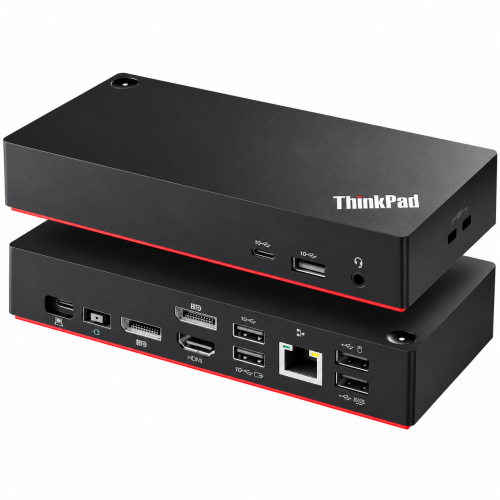
The dock connects to a laptop through its USB-C host cable. It includes two DisplayPort 1.4 outputs and one HDMI 2.0 output for supported monitors. Its USB ports, Ethernet port, and audio jack provide more ways to connect everyday accessories.
Why the Correct Model Matters
Not every laptop USB-C port supports video output or charging through a dock. Your laptop must provide the required video and data functions for the features you want to use. Check your laptop model and its connection support before placing an order.
Design & Performance
Design and Build
The Lenovo 40AY0090 has a compact black housing for desktop use. Its approximate dimensions are 171 x 80 x 31mm, and it weighs about 340g. This size can help you arrange your desk without giving the dock much space.
The dock includes a power button and two physical security lock slots. You can place it beside a monitor or another suitable spot on your desk. Keep the dock and its cables arranged neatly to make daily connections easier.
Performance in Daily Use
The dock provides two DisplayPort 1.4 ports and one HDMI 2.0 port. Lenovo documents support for up to three external monitors, including two 4K displays at 60Hz and a third at 4K 30Hz in a published configuration. Actual results depend on your laptop, graphics hardware, operating system, and available video bandwidth.
Three USB-A 10Gbps ports support compatible storage and other accessories, while two USB-A 2.0 ports suit keyboards and mice. A USB-C 10Gbps peripheral port supports compatible devices and provides a specified 5V/3A output. The dock also offers Gigabit Ethernet and a 3.5mm combination audio jack for supported equipment.
Charging and Power
The standard package includes a 90W Lenovo power adapter. With this adapter, the dock can provide up to 65W of charging power to a compatible laptop. Your laptop must support USB-C Power Delivery charging for this function.
A compatible Lenovo 135W slim-tip power adapter can allow up to 100W laptop charging under the stated conditions. This higher-wattage adapter is optional unless the specific retail bundle includes it. Check your laptop's charging needs and the supplied adapter before ordering.
Who It's For
Office and Home Office Users
This dock can suit people who use a laptop for daily office tasks. It helps connect supported monitors, a keyboard, a mouse, and wired networking from one place. Home-office users can reconnect their laptop through one USB-C host cable when they return to work.
Users Who Need More Screen Space
People who work with documents, spreadsheets, or communication apps may benefit from extra monitors. The dock offers three video outputs for supported display setups. Check your laptop's graphics and video support before relying on three screens or a specific resolution.
Business Teams and IT Users
Business teams can consider this dock for compatible ThinkPad, ThinkBook, and other laptops with suitable USB-C functions. Supported ThinkPad systems may also offer features such as Wake-on-LAN and MAC address passthrough. These functions depend on the laptop model, firmware, and operating system.
Simple Buying Guide
Check the Old Power Supply
If you are replacing an existing dock, note its model and power needs first. Compare the charging requirements of your laptop with the dock's available output. Ask the seller if you are unsure which adapter your chosen setup needs.
Match the Connectors
Check whether your monitors use HDMI or DisplayPort connections. Count the displays you want to connect and confirm that your laptop supports the planned setup. Also check your USB accessories, wired network needs, and headset connection.
Ask If You Are Not Sure
A USB-C socket alone does not confirm full dock compatibility. Check whether your laptop supports USB-C video output, data, and Power Delivery as needed. Contact IT Source with your laptop model before ordering if any detail is unclear.
Easy Steps to Check Before You Order
First, check your laptop model and confirm that its USB-C connection supports the functions you need. This is important for external displays and charging.
Next, count your monitors and check their HDMI or DisplayPort connections. Confirm the supported resolution and refresh rate for your laptop.
Then, compare your laptop's charging needs with the dock's 65W standard charging output. Ask about the optional 135W adapter if you need up to 100W charging.
Last, confirm the latest price, stock status, and package contents with IT Source. Check whether the listed bundle includes the accessories you need.
What's in the Box
The standard Lenovo retail package includes the ThinkPad Universal USB-C Dock (40AY), a 90W Lenovo AC power adapter, an AC power cord, an approximately one-meter USB-C host cable, and documentation. Package contents may differ for open-box, refurbished, or regional stock.
Check the product listing or ask IT Source to confirm the exact package contents before ordering. After delivery, compare the received items with the confirmed package details.
Why Buy From IT Source?
IT Source offers laptop docking stations, computer accessories, and connectivity products for customers in Bangladesh. You can contact the store to check the Lenovo 40AY0090's current price, stock status, and package contents. Share your laptop model to help confirm the connections and charging needs before purchase.
Ask IT Source about the available delivery options, payment methods, return conditions, and warranty coverage for this product. Confirm these details before placing your order, especially if you need a particular adapter or specific monitor setup. Checking these points helps you choose a dock that suits your needs.
Frequently Asked Questions
What is the Lenovo ThinkPad Universal USB-C Dock 40AY0090 used for?
This dock connects a compatible laptop to monitors, USB devices, wired networks, and audio accessories. It has two DisplayPort outputs and one HDMI output for supported displays. It can also charge a compatible laptop through its USB-C host connection.
What is the Lenovo ThinkPad Universal USB-C Dock 40AY0090 price in Bangladesh?
The latest Lenovo ThinkPad Universal USB-C Dock 40AY0090 price in Bangladesh should be checked on the IT Source product page. The current price is not provided in these product details. Contact the seller to confirm availability, package contents, and warranty information before ordering.
Will this dock work with my laptop and three monitors?
It supports compatible laptops with the required USB-C video and data functions. Lenovo documents support for up to three external monitors, but the results depend on your laptop and display setup. Confirm your laptop model, supported resolution, refresh rate, and charging needs with IT Source before purchase.
Check the Latest Price and Availability
Check the Lenovo ThinkPad Universal USB-C Dock 40AY0090 price in Bangladesh and order from IT Source today.