
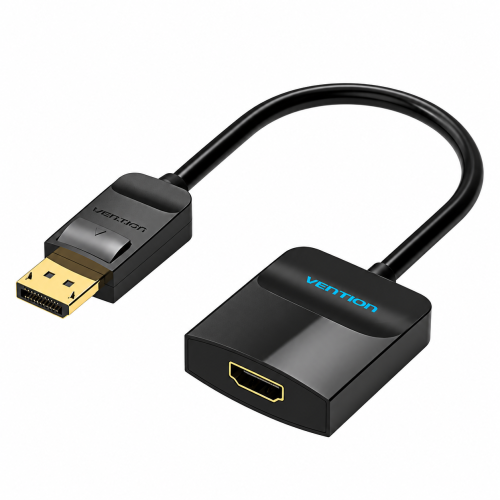
| Product Specifications | |
|---|---|
| Tech Specs | |
| Product Type | DisplayPort to HDMI Converter |
| Input Interface | DisplayPort Male (Full-Size) |
| Output Interface | HDMI Female |
| Maximum Resolution | 1920 × 1080 @ 60Hz |
| Conversion Direction | DisplayPort to HDMI Only |
| Audio Support | Digital Audio via HDMI (device-dependent) |
| Display Modes | Mirror and Extend (host-dependent) |
| Cable Length | 0.15 Meter |
| Connector Design | Latching DP Connector |
| Connector Plating | Gold-Plated |
| Color | Black |
| Compatible Source Devices | Computers with compatible DisplayPort video output |
| Compatible Displays | HDMI Monitors, TVs, Projectors |
| Warranty Information | |
| Warranty | N/A |
Check the Vention DP to HDMI Converter price in Bangladesh at IT Source. The Vention HBGBB connects a desktop computer, laptop, or workstation with a full-size DisplayPort output to an HDMI monitor, television, or projector. It supports Full HD 1080P resolution at 60Hz for clear everyday viewing.
This compact converter carries compatible digital video and audio through an HDMI connection. Its 0.15-meter cable and plug-and-play design make it useful for office work, presentations, home entertainment, and computer setups.
Check the latest price and availability at IT Source before ordering.
The Vention HBGBB is a compact display adapter designed to connect DisplayPort computers to HDMI screens.
Many desktop computers, business laptops, and graphics cards have DisplayPort video outputs. However, televisions, projectors, and some monitors use HDMI connections.
This converter makes it easier to connect those devices without changing the computer or display.
The adapter has a DisplayPort male connector and an HDMI female port. Connect the DP plug to your computer, then use a suitable HDMI cable to connect the converter to your screen.
The Vention HBGBB supports Full HD 1920 x 1080 resolution at 60Hz. This makes it suitable for spreadsheets, presentations, online meetings, video streaming, and everyday office applications.
Compatible computers can use mirror mode to show the same picture on two screens. Extended desktop mode provides additional workspace for multitasking.
The adapter also supports compatible digital audio transmission through HDMI. This is useful when connecting a computer to a television or display with built-in speakers.
The HBGBB is a one-way converter from DisplayPort to HDMI. It cannot convert an HDMI computer output into a DisplayPort monitor input.
The Vention HBGBB features a black compact housing with an integrated 0.15-meter cable. Its small size makes it easy to carry in a laptop bag or keep near a desktop computer.
The DisplayPort connector includes a locking mechanism that helps prevent accidental disconnection during use.
Gold-plated connector contacts provide a durable connection surface for repeated connections.
The short cable helps reduce unnecessary clutter when connecting an HDMI cable to a computer's DisplayPort output.
The Vention HBGBB supports video output up to 1920 x 1080 at 60Hz with compatible equipment.
It can connect an office computer to an HDMI monitor for daily productivity, presentations, and document work.
For home use, the adapter can connect a compatible DisplayPort computer to an HDMI television for videos, browsing, and other everyday activities.
It supports screen mirroring and extended desktop arrangements when the source computer and operating system allow them.
The converter can also transmit supported digital audio through HDMI. Audio playback depends on the source device, system settings, and receiving display.
The plug-and-play design normally requires no additional display software. Connect the adapter, attach an HDMI cable, and select the appropriate display input.
Actual picture quality depends on the computer's DisplayPort output, HDMI cable, connected display, and selected resolution.
The HBGBB is intended for Full HD output. For 4K displays requiring 4K resolution, choose a Vention adapter with an appropriate 4K specification.
The Vention HBGBB is useful for office workers who need to connect DisplayPort desktops and workstations to HDMI monitors.
Teachers and business presenters can use it to connect compatible laptops to HDMI projectors in classrooms and meeting rooms.
Students can use the converter with an external HDMI display for assignments, online learning, and multitasking.
Home users can connect DisplayPort computers to HDMI televisions or monitors for everyday entertainment and work.
IT technicians can also use the compact adapter when setting up compatible computers and display equipment.
The product includes one Vention HBGBB DisplayPort to HDMI Converter with an integrated 0.15-meter cable. A separate HDMI cable is needed to connect the adapter to the display.
IT Source offers computer accessories, display converters, and connectivity products for customers in Bangladesh.
You can review the Vention HBGBB specifications before selecting a converter for your computer and monitor.
Contact IT Source to confirm product compatibility, the latest price, and availability before ordering.
Yes. It supports Full HD 1920 x 1080 resolution at 60Hz with compatible DisplayPort computers and HDMI displays.
No. It converts DisplayPort output to HDMI input only. For an HDMI-output computer and DisplayPort-input monitor, a different converter is required.
Check the IT Source product page for the latest Vention HBGBB price and availability. Confirm your computer has a full-size DisplayPort output before purchasing.
Check the latest price and availability at IT Source.
Explore the Vention DP to HDMI Converter price in Bangladesh for convenient Full HD connections to HDMI displays.
Get specific details about this product from customers who own it.