
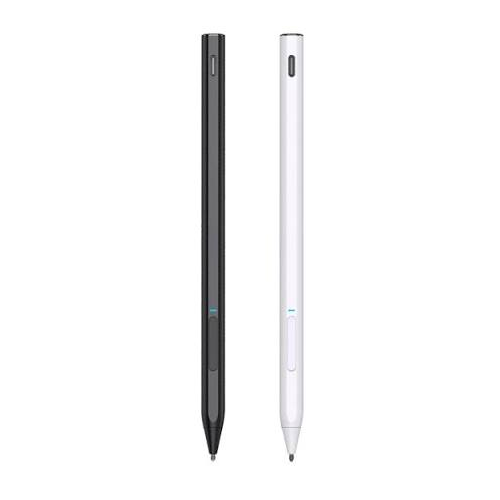
| Product Specifications | |
|---|---|
| Tech Specs | |
| Product Type | Active Stylus Pen |
| Pen Technology | MPP |
| Compatible Devices | Supported Surface Pen-Enabled Devices* |
| Primary Functions | Handwriting, Drawing, Annotation |
| Pressure Sensitivity | 4096 |
| Colour | Black/ silver |
| Charging | USB C |
| Button Configuration | Yes |
| Material | Aluminium |
| Warranty Information | |
| Warranty | N/A |
The Active Stylus Pen for Microsoft Surface is a digital writing accessory intended for use with compatible Surface pen-enabled devices. It provides a convenient way to interact with supported touchscreens for handwritten notes, drawing, document annotation and everyday navigation. Designed for users who prefer pen-based input, this Surface-compatible stylus can support more direct interaction with digital content than conventional mouse-based workflows. Whether preparing classroom notes, reviewing documents or sketching ideas, it offers a practical pen-style approach to touchscreen productivity. Compatibility and available functions depend on the exact stylus model and Surface device.
The Active Stylus Pen for Microsoft Surface is intended for users who want a pen-style input accessory for a compatible Surface computer or tablet. Unlike a simple passive touchscreen pointer, an active stylus is designed to communicate with a supported pen digitizer to enable digital writing and related functions. It can be useful for capturing handwritten ideas, marking up documents and interacting with drawing applications. Surface devices use specific pen technologies, so the stylus must support the protocol required by the target computer. The availability of pressure sensitivity, tilt, palm rejection, shortcut buttons and charging features depends on the exact pen hardware.
An active stylus is intended to provide pen-based interaction with a touchscreen equipped with compatible digitizer hardware. This makes it useful for writing directly onto digital pages, marking documents and interacting with software that supports pen input. Microsoft Surface devices support different generations of pen technology, and their capabilities vary by model. The stylus and computer must use compatible technology for active writing to work correctly. Buyers should therefore check the exact Surface device and the stylus protocol before purchasing rather than relying on touchscreen support alone.
A compatible Surface active pen can provide a convenient alternative to typing when capturing handwritten notes, drawing simple diagrams or working through ideas. Applications such as Microsoft OneNote and other Windows inking tools support handwritten content on suitable pen-enabled devices. This can be useful for students attending classes, teachers preparing lessons and professionals recording meeting notes. Pen input also allows users to combine handwriting with existing digital documents, helping keep information organized without transferring notes from paper. Writing accuracy and available functions depend on the stylus, digitizer and application.
Pen-based touchscreen input is useful for sketching layouts, creating diagrams and adding handwritten details to digital projects. Compatible drawing applications allow users to select brushes, work with digital canvases and develop illustrations directly on a supported Surface screen. Some active stylus models also offer pressure sensitivity or tilt recognition, which can provide additional control over brush strokes and shading. These advanced features are not universal and must be verified for the specific pen. Users who need professional drawing capabilities should confirm the supported pressure levels and tilt functionality before ordering.
A Surface-compatible active stylus can make document review more convenient by allowing users to highlight information, add handwritten comments and mark important sections in supported applications. It is useful for reviewing lecture materials, preparing business documents and working with digital worksheets. Pen-based interaction can also simplify selecting content or navigating interfaces when a compatible application supports those actions. Features such as right-click buttons and digital erasers depend on the individual stylus design. Users should verify the available controls instead of assuming that every Surface-compatible pen includes the same editing functions.
Windows provides pen and inking features for supported hardware, allowing users to work with handwritten notes, digital drawing tools and document annotation applications. On a compatible Surface device, an active stylus can be used with applications that recognize the pen input provided by the system. The available experience depends on the Windows version, Surface hardware and pen protocol. Some applications support basic handwriting, while others offer advanced drawing and editing functions. Compatibility with Windows Ink does not automatically guarantee every feature, so users should confirm the pen's supported functions and their intended software requirements.
Choosing the correct stylus requires more than checking whether a computer belongs to the Microsoft Surface family. Different Surface generations support different pen technologies, and some models do not support active handwriting at all. A third-party stylus must be matched to the device's supported Microsoft Pen Protocol version or other manufacturer-confirmed pen requirements. Customers should also check the pen's power source, charging method, button configuration and available drawing features. Verifying these details before purchase helps avoid compatibility problems and ensures that the selected accessory meets the user's handwriting or creative needs.
The Active Stylus Pen for Microsoft Surface is intended for students, teachers, office professionals, digital note-takers and creative users who own a compatible Surface pen-enabled device. It is useful for handwritten notes, document markup, diagrams, digital sketching and supported touchscreen navigation. Buyers looking for a replacement or alternative to a Microsoft-branded Surface Pen should confirm the exact third-party stylus model and its compatibility before purchasing.
Looking for an Active Stylus Pen for Microsoft Surface price in Bangladesh? A compatible digital stylus can be a useful accessory for handwriting, drawing, document annotation and everyday Surface productivity. Different stylus models offer different features, including pen protocols, pressure sensitivity, buttons and charging options. Check IT Source BD for the latest Active Stylus Pen for Surface price in Bangladesh, stock availability and applicable warranty information. Before placing an order, confirm the stylus model and your Surface device's pen compatibility to ensure the accessory meets your requirements.
IT Source BD offers computer accessories, stylus pens and connectivity products for customers in Bangladesh. Our product information focuses on practical usage, relevant specifications and compatibility considerations that help buyers make informed decisions. When selecting an active stylus for Microsoft Surface, checking the pen protocol and exact device model is especially important. Customers can review product availability and applicable purchase conditions before choosing an accessory for their Surface computer.
Buy Active Stylus Pen for Microsoft Surface from IT Source Bangladesh
Explore convenient digital handwriting, drawing and document annotation with a stylus matched to your compatible Surface device.
Get specific details about this product from customers who own it.