
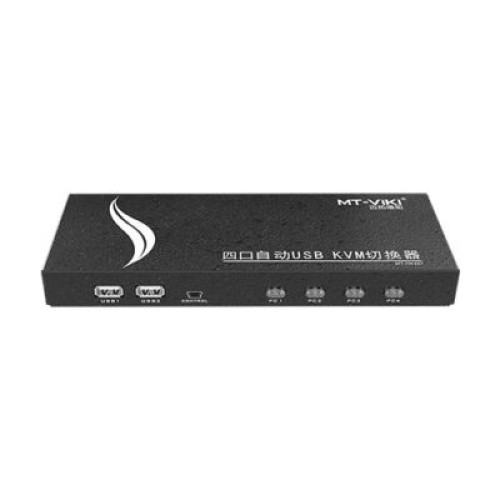
| Product Specifications | |
|---|---|
| Tech Specs | |
| Product Type | HDMI USB KVM Switch |
| KVM Configuration | 4 Computers to 1 Monitor |
| HDMI Inputs | 4 × HDMI |
| HDMI Output | 1 × HDMI |
| USB Host Inputs | 4 × USB-B |
| Shared USB Ports | 4 × USB 2.0 |
| Standard UHD Video | 3840 × 2160 @ 30Hz |
| Additional UHD Mode | 4K@60Hz at 4:2:0 |
| EDID Support | Yes |
| Switching Methods | Button, Hotkey, Wired Controller, Auto Scan |
| Keyboard Compatibility | Standard and compatible mechanical keyboards |
| Peripheral Sharing | Keyboard, Mouse, Printer, USB Storage |
| USB Data Rate | Up to 480Mbps |
| Power Input | DC 5V |
| Housing | Metal |
| Installation | Plug and Play |
| Operating Systems | Windows, macOS, Linux |
| Warranty Information | |
| Warranty | N/A |
The MT-VIKI MT-HK401 is a 4-Port HDMI USB KVM Switch designed to manage four computers using a single HDMI monitor, keyboard and mouse. With 4K@30Hz video support, an additional 4K@60Hz 4:2:0 mode, four USB 2.0 peripheral connections and multiple switching methods, it simplifies everyday multi-computer operation.
Whether you manage office desktops, test computer hardware or work with several systems at one desk, the MT-HK401 helps reduce duplicate peripherals and cable changes. Explore the MT-VIKI MT-HK401 HDMI KVM Switch price in Bangladesh at IT Source.
Managing multiple computers with separate keyboards, mice and monitors can make a workstation crowded and inconvenient. The MT-VIKI MT-HK401 provides a centralized solution by connecting four HDMI-equipped computers to one shared monitor and set of USB peripherals.
Each computer connects through its HDMI video output and USB host connection. The selected computer's video appears on the monitor, while the shared keyboard, mouse and compatible USB accessories become available to that system.
Four USB 2.0 peripheral ports allow users to connect everyday devices without repeatedly changing cables. The switch also provides several ways to select a computer, including front-panel buttons, keyboard hotkeys, automatic scanning and a wired desktop controller.
The MT-HK401 is a single-monitor KVM switch. It displays one selected computer at a time rather than showing all four screens simultaneously.
The MT-VIKI MT-HK401 provides four HDMI computer inputs and four USB-B host connections, allowing up to four compatible computers to remain connected to the same KVM unit.
This configuration is useful for IT technicians who regularly troubleshoot multiple PCs, office users who maintain separate systems and computer laboratories where several machines need local access.
Instead of reconnecting the monitor, keyboard and mouse whenever a different computer is needed, the operator can select the required system while keeping all connections in place.
Each computer requires both an HDMI video connection and a corresponding USB connection for complete KVM functionality.
The MT-HK401 supports 3840 × 2160 video at 30Hz, making it suitable for displaying detailed computer interfaces, office applications, technical information and multimedia on compatible UHD monitors.
MT-VIKI also documents 4K@60Hz operation using 4:2:0 chroma subsampling. This format reduces color information compared with 4:4:4 and can make fine colored text or interface details appear less sharp.
For work involving spreadsheets, programming, graphic interfaces and other text-heavy applications, buyers should consider this distinction when selecting a 4K monitor configuration.
Actual video performance depends on the connected computer, monitor, HDMI cables and supported signal format. Full 4K@60Hz 4:4:4 output should not be assumed for this model.
The MT-HK401 provides four shared USB 2.0 ports for connecting compatible keyboards, mice, USB flash drives, printers and other USB peripherals.
This allows users to keep essential accessories connected to the KVM rather than moving them between computers. When a different PC is selected, the shared peripherals become available to that computer.
USB 2.0 has a theoretical maximum signaling speed of 480Mbps, making it suitable for standard input devices, office peripherals and basic file transfers.
It does not provide USB 3.0 transfer speeds. Users should also safely eject removable storage before switching computers to avoid interrupting active file operations.
The MT-VIKI MT-HK401 supports four computer-selection methods: physical button switching, keyboard hotkeys, automatic scanning and a wired desktop controller.
Front-panel buttons are useful when the KVM is placed within easy reach. Keyboard hotkeys provide a convenient way to change computers directly from the shared keyboard.
The wired desktop controller allows the main KVM unit to remain near the cable connections while the selection control is positioned closer to the user.
Automatic scanning can cycle through connected computer channels for monitoring purposes. Exact keyboard shortcuts and scan settings should be configured according to the manufacturer manual.
The MT-HK401 supports EDID communication to help connected computers identify compatible display capabilities. This is useful in a multi-computer environment where a single monitor is shared across several systems.
The manufacturer lists compatibility with Windows, macOS and Linux, alongside other operating systems. Standard KVM functionality is designed for plug-and-play operation without dedicated switching software.
MT-VIKI also documents support for compatible mechanical keyboards and wireless keyboard or mouse devices. Individual peripheral compatibility can depend on USB behavior and device-specific drivers.
Video conversion involving HDMI, VGA or DVI may be possible with suitable converters, but the manufacturer advises reducing the resolution for certain converted connections. Native HDMI connections are preferable when available.
The MT-VIKI MT-HK401 uses a metal enclosure intended for regular desktop and technical workstation use. Its compact construction keeps the four-computer HDMI and USB connections organized in one central device.
A dedicated 5V power adapter is specified by the manufacturer. This provides an external power source for the KVM and its shared peripheral connections.
For installation, connect each computer through its HDMI and USB host interfaces, attach the shared monitor and peripherals, and connect the supplied power source. The operator can then select the active computer using the preferred switching method.
Clearly labeling the four computer connections can make troubleshooting and everyday operation easier, especially in IT maintenance environments.
The MT-VIKI MT-HK401 is suitable for IT technicians, system administrators, office professionals, computer repair facilities and users who operate multiple desktops from one location.
It is especially useful for computer configuration, operating-system installation, technical diagnostics and workplaces where four computers can share a single monitor and set of peripherals.
Users requiring simultaneous display of multiple computers, dual-monitor output or full-color 4K@60Hz 4:4:4 should consider a different KVM configuration.
IT Source offers computer connectivity accessories and KVM switching solutions for customers in Bangladesh. The MT-VIKI MT-HK401 is a practical option for buyers seeking four-computer HDMI control, shared USB 2.0 peripherals and convenient switching methods.
Contact IT Source to confirm the latest price, product availability, applicable warranty and compatibility with your equipment before ordering.
Yes. It allows four computers to share one HDMI monitor, keyboard, mouse and compatible USB peripherals. Only the selected computer is displayed at a time.
Yes, but with an important limitation. The manufacturer specifies 4K@60Hz using 4:2:0 chroma subsampling. Standard 4K@30Hz operation is also supported. Full 4K@60Hz 4:4:4 is not confirmed.
You can use the front-panel buttons, keyboard hotkeys, wired desktop controller or automatic scanning. Refer to the supplied manual for specific controls and settings.
Get specific details about this product from customers who own it.