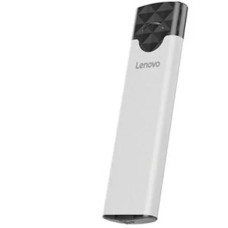
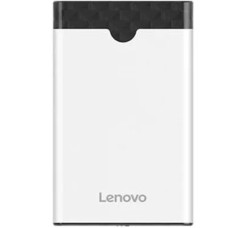
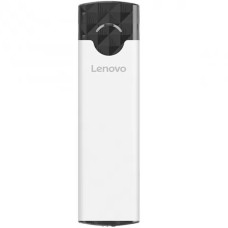
The Lenovo HDD-SSD Enclosure offers the highest level of file protection to safeguard your priceless data. Solid-state drives (SSDs) and hard drives are protected in a safe environment with Lenovo enclosures thanks to their sophisticated encryption technology and sturdy construction. Whether at home or at work, protect your private information against illegal access and possible data breaches. Data security is a top priority for Lenovo, giving you piece of mind that your information are protected from dangers. Furthermore, Lenovo enclosures shield your drives from physical harm with their sturdy construction and shock-resistant features. Put your trust in Lenovo HDD-SSD Enclosure to safeguard your data and preserve your digital assets from unanticipated threats.
Lenovo provides a range of HDD-SSD Enclosures designed to satisfy various storage requirements. Every type, from the adaptable Lenovo External Drive Enclosure to the more economical Lenovo HDD-SSD Enclosure priced in BD, guarantees flawless data management. The Lenovo USB 3.0 Enclosure offers worldwide compatibility, while the Lenovo SATA Enclosure offers fast data transmission. Take into consideration the Lenovo Aluminum HDD Enclosure for improved heat dissipation and durability. Lenovo offers an enclosure to meet your storage needs, no matter what they are.
2.5 inch HDD Enclosure
Solid-state drives (SSDs) or 2.5-inch SATA hard disk drives (HDDs) can be installed in the Lenovo 2.5-inch HDD Enclosure. It offers a lightweight and portable way to change internal hard drives in laptops and desktop computers into external storage. This enclosure provides convenient data transfer and backup alternatives for consumers on the road thanks to its small size and USB connectivity.
3.5 inch HDD Enclosure
Designed to accommodate 3.5-inch SATA HDDs, the Lenovo 3.5 inch HDD Enclosure provides a dependable and effective means of transforming internal desktop hard drives into external storage options. This enclosure is ideal for multimedia applications, file storage, backup, and rapid data transfer rates due to its strong build and high-speed USB interface.
M.2 HDD-SSD Enclosure
Designed specifically for M.2 solid-state drives (SSDs), the Lenovo M.2 HDD-SSD Enclosure offers a flexible and transportable option for increasing storage capacity or replacing storage devices. This enclosure, with its elegant appearance and fast USB interface, provides easy access to M.2 SSDs and data transfer, making it the perfect choice for those looking for more dependability and performance from their storage options.
Aluminum HDD Enclosure
The Lenovo Aluminum HDD Enclosure is a sturdy casing for internal hard drives or SSDs that blends style and endurance. These enclosures, which are made of premium aluminum alloy, provide your storage devices with both physical protection and efficient heat dissipation. For consumers wishing to improve their storage options, Lenovo aluminum enclosures offer dependable performance and fashionable looks with USB connectivity and compatibility with a range of drive sizes.
External Drive Enclosure
You may convert your internal HDD or SSD into a portable external drive with the Lenovo External Drive Enclosure. Lenovo enclosures provide convenient on-the-go file access with USB connectivity, therefore augmenting storage versatility and ease of use.
SATA Enclosure
Lenovo SATA Enclosure offers a smooth connection for data transfer and storage expansion by accommodating SSDs and SATA hard drives. Lenovo enclosures enable interoperability with a broad range of storage devices by supporting SATA interface standards.
With USB 3.0 or higher interfaces, Lenovo HDD-SSD Enclosures provide high-speed connectivity and quick data transfer rates for effective file management. Lenovo enclosures provide quick speed for transferring huge files, backing up critical data, and retrieving stored material. Users benefit from quicker data transmission speeds using USB 3.0 technology as opposed to conventional USB connections, which increases convenience and productivity. Lenovo HDD-SSD Enclosures, built for maximum speed and efficiency, provide smooth file access.
Because of its compact size, Lenovo HDD-SSD Enclosures are perfect for customers who are always on the road. These enclosures' lightweight and small design makes them simple to carry about and enable users to access their data from any location. Lenovo enclosures enable flexibility and ease whether working remotely or moving between sites. Users may easily extend storage space and access data at any time and from any location thanks to their portable design, which guarantees smooth integration into a variety of situations.
With the tool-free installation capability of Lenovo HDD-SSD Enclosures, setup is hassle-free. Bid farewell to laborious setups and complex gear. Lenovo makes installation and changing SSDs and hard drives simple. Just insert the drive into the enclosure, fasten it firmly, and you're good to go. With no additional equipment needed, customers can rapidly access and use their storage devices thanks to this easy design, which saves time and effort. With Lenovo HDD-SSD Enclosures, installation is simple and integration is flawless.
LED indicators that show the power status, data transfer activity, and disk connection are features of Lenovo HDD-SSD Enclosures. Once the enclosure is switched on and operational, the LED indication illuminates. It flashes or blinks to indicate activity while data transfer is happening, informing consumers of the procedure. For added convenience and peace of mind, customers can effortlessly and quickly monitor the state of their storage devices thanks to the LED indicator, which also verifies drive connectivity.
It Source stands as Bangladesh's largest retail destination for USB & Type C HUB, HDD-SSD Enclosure and Laptop Bag & Sleeve. Visit any of our branches for unbeatable deals on your preferred Lenovo HDD-SSD Enclosure. Additionally, our extensive range of products and services is available on the It Source online store. Choose from a variety of payment methods and enjoy hassle-free EMI options. Our delivery network spans across Bangladesh, ensuring nationwide coverage. Shop with us for convenience, reliability, and exceptional value.
Q1: How do I install a hard drive or SSD into a Lenovo HDD-SSD Enclosure?
A1: To install a hard drive or SSD into a Lenovo HDD-SSD Enclosure, simply open the enclosure, insert the drive into the designated slot, and secure it in place. No tools are required for installation, making it quick and easy to set up.
Q2: What types of hard drives and SSDs are compatible with Lenovo HDD-SSD Enclosures?
A2: Lenovo HDD-SSD Enclosures are compatible with a wide range of hard disk drives (HDDs) and solid-state drives (SSDs), including 2.5-inch and 3.5-inch HDDs, as well as M.2 SSDs, providing versatility in storage options.
Q3: How fast is the data transfer speed of Lenovo HDD-SSD Enclosures?
A3: Lenovo HDD-SSD Enclosures feature high-speed connectivity with USB 3.0 or higher interfaces, offering rapid data transfer rates for efficient file management and access. The exact transfer speed may vary depending on the specific model and drive used.
Q4: Does Lenovo HDD-SSD Enclosure provide any security features for data protection?
A4: Some Lenovo HDD-SSD Enclosures offer security features such as password protection or encryption to safeguard sensitive data and ensure privacy and confidentiality, providing users with peace of mind.
Q5: What are the LED indicator lights on Lenovo HDD-SSD Enclosures used for?
A5: The LED indicator lights on Lenovo HDD-SSD Enclosures provide visual cues for power status, data transfer activity, and drive connectivity, allowing users to easily monitor the status of their storage devices at a glance.
| Product Name | Price |
|---|---|
| Lenovo M01 M.2 Gen-1 SSD enclosure | 1,850৳ |
| Lenovo S04 2.5 inch Type-C Hard Disk Enclosure | 1,350৳ |